




How to Automate Vulnerability Remediation in 2026
Developers and security engineers have long accepted the vulnerability backlog as a fact of life. You can't fix everything, so you patch what's critical, report new numbers, and the rest were tossed aside, or "for the next hire."
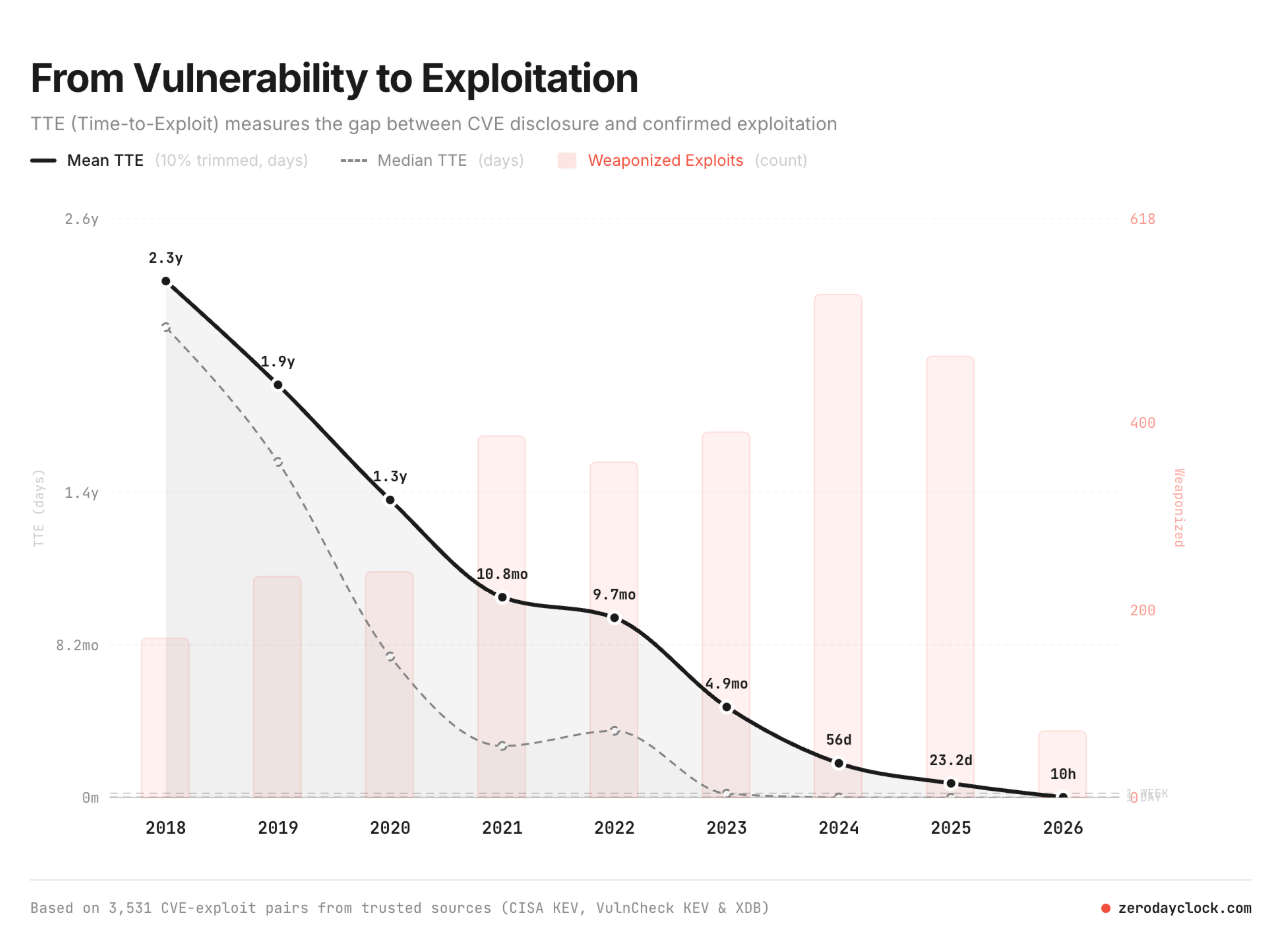
That math worked when attackers needed months to weaponize a new flaw, but AI has collapsed that window into hours. At Endor Labs, we've observed attackers moving from vulnerability to exploit in under 10 hours. And according to the latest M-Trends report, the exploitation window now sits at -7 days days, meaning attackers are exploiting vulnerabilities before CVEs are disclosed.
Vulnerability remediation automation is the practice of using software to carry out the fix, not just the scans. This article covers how it works, what to automate, and what to keep under human review.
Why Manual Vulnerability Remediation Breaks Down at Scale
Backlog is a math problem. A scanner reports more findings than any team can fix, the findings arrive faster than the team can triage them, and the queue grows.
Manual remediation made sense when release cycles ran in quarters. Modern software ships many times a day, pulls most of its code from open source, and inherits a flood of new advisories with every dependency.
Two forces now break the manual model for good:
- The volume of vulnerabilities has hit the breaking point: NIST experienced a 263% increase in CVE submissions between 2020 and 2025, with submissions in Q1 2026 running nearly one-third higher than the same period last year. At Endor Labs, we observed the same number of CVEs in the first 100 days of 2026 as in all of 2025.
- Frontier AI models can chain vulnerabilities: Models like Mythos and ChatGPT-5.5 can chain multiple vulnerabilities together to generate exploits. They are also better at finding vulnerabilities than previous generations of models.
- Attackers have access to the same AI models as defenders: This is the big one and predates the arrival of the latest generation of AI models. The exploitation window now sits at -7 days days, because attackers can also leverage AI to probe for weaknesses and generate working exploits.
How Automated Vulnerability Remediation Works Across the SDLC
Automated remediation is not one action. It is a loop that runs across the software lifecycle, from the first scan to the re-scan after the fix ships. Four stages make up the loop.
Detect and Prioritize Vulnerabilities
The loop starts with detection across code, dependencies, and containers, and it lives or dies on prioritization. A scan that reports every CVE recreates the backlog in automated form. Reachability analysis fixes that: it traces the call graph to mark which vulnerabilities sit on paths your code runs, and it layers EPSS and the CISA KEV catalog to rank by exploitability. The output is a short list of findings that carry real risk, not a wall of severity scores.
Apply Patches and Safe Upgrades
Once the system knows what matters, it applies the fix. For most vulnerabilities that means an upgrade, and the automation checks the blast radius before it merges through upgrade impact analysis. When a clean upgrade breaks too much or does not exist, a backported patch closes the CVE without the version bump. The full mechanics of doing this at scale live in the guide to automated dependency updates.
Validate Fixes Before Deployment
A fix is not done until it is proven. The automation runs each fix through the test suite, static analysis, and integration checks, and gates the merge on a green result. In an agentic loop, one agent proposes the fix, another tests it, and a third confirms it introduced no new risk. Validation is what keeps automation from shipping a break.
Monitor and Re-Scan Post-Remediation
After shipping, the system re-scans to confirm the vulnerability is gone and no regression took its place, and the loop closes. Continuous monitoring catches the next advisory as it lands, so the fix holds and the backlog doesn't rebuild.
What You Can Automate vs. What Still Needs Human Judgment
Automation is not all-or-nothing. Some fixes are safe to automate, and some need a human. Here are key differences to know to help you decide which path makes more sense.
Dependency Vulnerabilities and Known CVEs
These are the strongest fit for automation. A known CVE in a dependency has a known fix: upgrade to the patched version, or apply a backported patch. The blast radius is measurable through impact analysis, and the validation is testable. This is where automation clears the most backlog with the least risk, so it is where to start.
Insecure Code Patterns and Misconfigurations
Recurring patterns automate well too. A hardcoded secret, a missing input check, an insecure default in a config file: these follow known shapes, and a tool can flag and fix them against a policy. The automation enforces the guardrail in CI so the same mistake does not ship twice. Human review still sets the policy and handles the edge cases the pattern does not cover.
Business Logic Flaws and Architectural Weaknesses
A business logic flaw depends on what the application is supposed to do, based on intent. An architectural weakness needs a design decision, not a patch. These require a human who understands the system and the business, so the right move is to surface them for review, not to auto-fix them. A tool that claims to automate these is selling the hype, not the fix.
Key Benefits of Vulnerability Remediation Automation
The payoff shows up in three places: speed, developer time, and audit readiness.
Reduced MTTR and Smaller Exposure Windows
The core benefit is time. Automation compresses mean time to remediate from the weeks a manual process takes to the hours an automated loop needs. A shorter MTTR means a smaller exposure window, and in a world where attackers weaponize flaws in days, the size of that window is the size of your risk.
Developer Productivity Without Security Trade-Offs
Automation takes the tedious work off developers without asking them to accept more risk. Instead of triaging a wall of findings or hand-testing every upgrade, developers review validated fixes with the evidence attached. Security gets faster remediation, engineering gets its time back, and the old friction between the two teams eases, because the automation does the work neither side wanted to own.
Compliance Readiness for FedRAMP, CRA, and PCI DSS
Regulations put deadlines on remediation. FedRAMP expects high-severity findings closed within 30 days. PCI DSS requires critical patches within a month of release. The EU Cyber Resilience Act obliges vendors to handle and report vulnerabilities across a product's life. Automation produces the evidence these frameworks demand as a byproduct of the fix: a record of what was found, when it was closed, and how it was validated.
How to Implement Vulnerability Remediation Automation
Rolling out automation is a sequence, not a switch. Four steps take a team from manual to automated without breaking trust along the way.
Start with Risk-Based Prioritization
Automation amplifies whatever you point it at, so point it at real risk. Rank findings by reachability and exploitability before you automate anything, so the system works on the vulnerabilities that matter instead of every CVE in the report. "Patch everything" was always broken, because most CVEs never run in your code. Risk-based prioritization is what makes automation an asset instead of a faster way to chase noise.
Automate Deterministic Fixes First
Begin where the fix is known and the blast radius is measurable: dependency upgrades and backported patches for known CVEs. These clear the most backlog with the least risk, and they build the trust you need before you widen the scope. Prove the loop on low-risk, high-volume fixes, then expand.
Integrate Remediation into CI/CD Pipelines
Automation belongs in the pipeline, not beside it. Wire remediation into CI/CD so fixes flow through the same gates as any other change: tests, branch protection, and review. The fix lands as a pull request the team can see, and it merges on a green build. This keeps automation transparent and keeps developers in control of what ships.
Define Boundaries Between Automation and Human Review
Draw the line before you scale, not after. Decide which fixes the system can merge on its own and which need a human sign-off: production code, business-critical paths, and anything outside the deterministic set. Clear boundaries are what let a team trust automation, because everyone knows where the machine stops and the human starts.
What to Look for in a Vulnerability Remediation Automation Platform
Not every "automated" platform automates the part that matters. When you evaluate one, test it against the capabilities that separate real remediation from faster scanning.
Look for reachability that gates the work, so the platform automates fixes for what runs, not every finding. Look for upgrade impact analysis, so the automation ships upgrades that hold and flags the ones that break. Look for backported patches, so a blocked upgrade does not leave a known risk open. Look for coverage transparency, so the tool tells you what it cannot scan instead of reporting a false all-clear. And look for evidence: every automated action should carry a record of why it ran, so a human can audit it and an auditor can trust it. Compare platforms in depth in the guide to the best vulnerability remediation tools.
The End of the Patch Backlog
Put the pieces together and the backlog stops being permanent. When automation prioritizes by reachability, fixes what runs, validates before it ships, and re-scans after, the queue stops growing faster than the team can drain it. The backlog was never a law of nature. It was a symptom of manual work meeting machine-speed threats.
Frontier AI created the pressure by collapsing time-to-exploit, and the same class of technology is the answer: continuous, agentic remediation that closes the gap between found and fixed. The teams that automate the deterministic majority and reserve human judgment for the rest will run without a backlog, while the teams that keep patching by hand will fall further behind with every release.
Frequently Asked Questions About Vulnerability Remediation Automation
Does automated remediation replace developer involvement entirely? No. Automation handles the deterministic fixes: dependency upgrades and backported patches for known CVEs, validated and gated in the pipeline. Developers keep control of policy, approve high-risk changes, and own the business logic and architectural decisions no tool can make. The model is augmentation, not replacement.
How does reachability analysis affect remediation prioritization? It moves prioritization from severity to exploitability. Reachability traces whether your code runs a vulnerable function, so a critical CVE in dead code drops down the list and a reachable flaw on a live path rises to the top. Because most flagged vulnerabilities never run, reachability is what lets automation work on the few that matter.
Can automated dependency upgrades break application code? They can, which is why impact analysis matters. A version bump can remove an API your code calls or pull a transitive dependency to a conflicting release. Upgrade impact analysis maps that blast radius before the merge, so the automation ships the upgrades that hold and routes the risky ones to a patch or a human.
How do compliance SLAs affect remediation automation timelines? They set the clock. FedRAMP expects high-severity findings closed within 30 days, PCI DSS requires critical patches within a month, and the EU Cyber Resilience Act obliges vendors to handle and report vulnerabilities across a product's life. Automation helps teams meet these deadlines and produces the audit record that proves they did.
What's next?
When you're ready to take the next step in securing your software supply chain, here are 3 ways Endor Labs can help: