




Agent, harness, hook, skill, plugin, MCP server. Not long ago, most of these words rarely came up in AppSec conversations. Now they show up in architecture reviews, vendor pitches, and planning docs, usually without a definition attached.
And almost nobody stops to ask what they mean. Nobody wants to be the person who raises a hand in the meeting with a question that might sound dumb, so we all do the reasonable thing: use the terms, nod along, and quietly hope nobody asks us to explain them.
That's not really anyone's fault. The agentic development stack assembled itself on developer laptops over about eighteen months, without a procurement cycle, a threat model, or a control plan, and nobody handed out a glossary. The definitions are still moving, too, as the technology changes and people find new uses for it.
It starts to matter when those terms turn into tooling decisions. In IDC's July 2026 DevSecOps and Application Security Survey, 79.6% of respondents said code security capabilities from frontier AI companies were causing at least a moderate reassessment of their AppSec tools. That's a lot of decisions riding on words that mean different things to different people.
So think of this post as the friend you can ask the dumb questions (they're not actually dumb). At Endor Labs, we spend our days building security for agentic development, so we've had to get precise about these terms. For each one, we'll cover what it is, where it sits in the agentic development lifecycle, and why it matters for security: where AppSec can plug in, how it becomes an attack surface, or both.
What is a model?
The model is the AI at the center of an agent. In coding agents, it's almost always a large language model (LLM), and its job is narrower than people tend to assume: read context, reason about it, and request tool calls. On its own, it executes nothing. It can't run a command, open a file, or install a package. It can only ask.
It also usually isn't on your machine. When you use Claude Code or Cursor, the model typically runs on the provider's infrastructure, and the software on your laptop calls it over an API. That's why you can switch Cursor from a Claude model to GPT or Gemini and nothing else about your setup changes.
For security, the model's core weakness is that it can't reliably tell data from instructions. Anything it reads (a README, an issue comment, a tool description) can try to steer it, which is the root of prompt injection. So most security controls sit around the model rather than inside it: in the software that runs it, and on the traffic to it. Some AppSec vendors also train or fine-tune models specifically for security tasks, to try to improve the model itself rather than constraining a general-purpose one.
What is a harness?
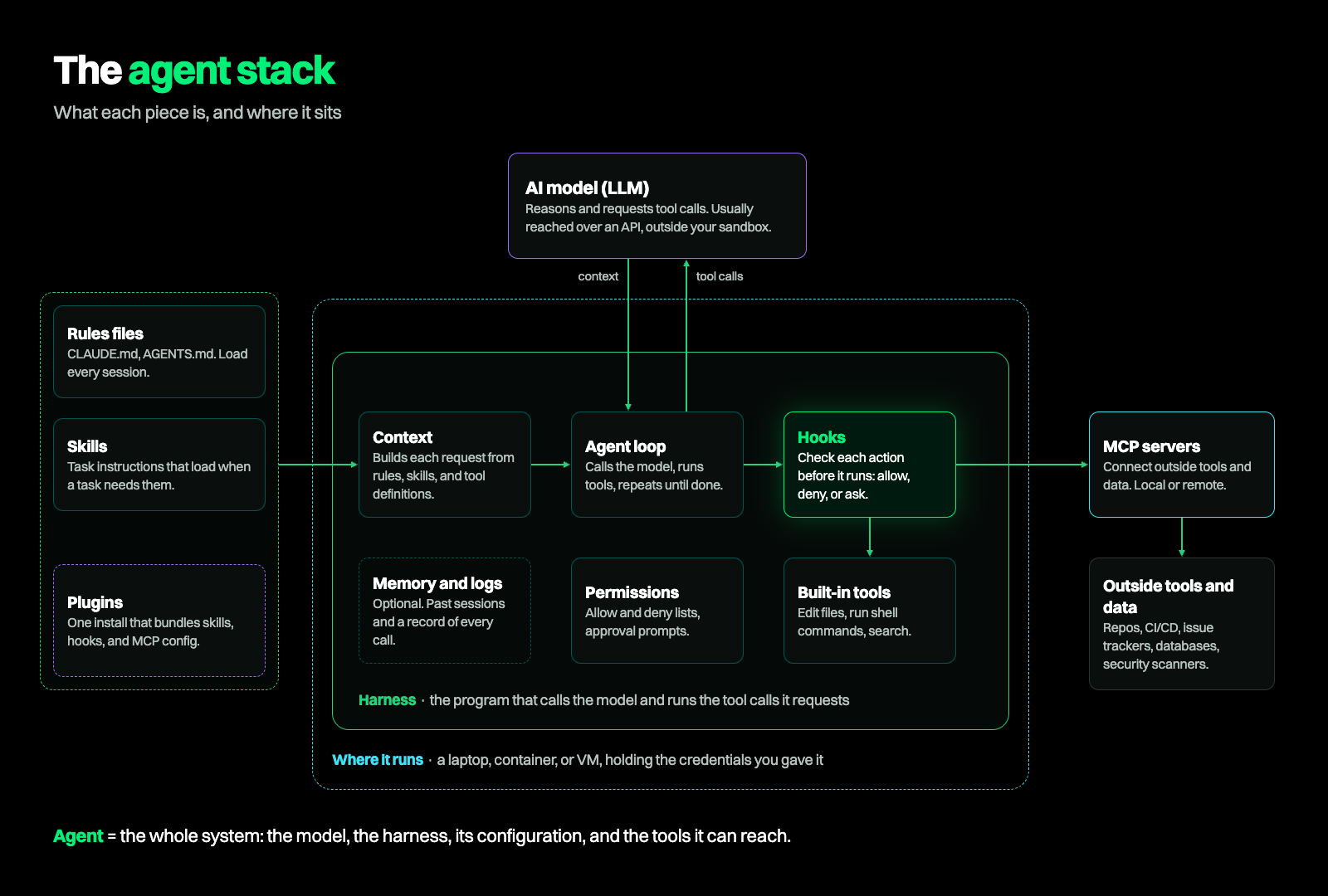
A harness is the program that runs in your environment, calls the model, and executes the tool calls it requests, within limits you set. Claude Code, Cursor, and Codex are all harnesses. So is Claude Design, which uses the same pattern to build slides and mockups instead of code.
Most harnesses include some mix of the same parts. There's context management, which decides what goes into each request to the model, and the agent loop, which calls the model, runs the tools it asks for, and repeats until the task is done. There are guardrails and approvals, which check each request against your settings (and sometimes ask you first), and a tool executor, which actually runs the command or edit once it's allowed. Many also keep memory (notes and past sessions the agent can reload, so it remembers what it learned and did before) and a log of every model and tool call. Not every harness has every piece, and they don't all name them the same way.
The harness runs wherever you put it: a developer's laptop, a container, a VM. And it holds whatever credentials you've given it. This is why the harness matters so much for security. It holds the keys and runs every action, so its permissions set the blast radius. It's also where policy gets enforced, through permission settings and hooks (more on those below).
The harness also shapes how secure the resulting code is, sometimes as much as the model does. In our Agent Security League benchmark, Claude Fable 5 running in Cursor wrote functionally correct code 72.6% of the time and secure code 29.0% of the time. The same model in Claude Code scored 59.8% and 19.0%, respectively. The gap isn't always that wide (with GPT-5.5, Cursor and Codex were only 1.6 points apart on security), so the honest version is that the harness can shape outcomes, not that it always wins.
Security work can have its own harness too, and AURI by Endor Labs is exactly that type of harness. It operates with the same pattern of a program wrapped around models and tools, built to find, triage, and fix vulnerabilities instead of writing features.
What is an agent?
An agent is the whole system: model, harness, configuration, and tools working together toward a goal. From a security point of view, a coding agent is a process on a developer's machine with a shell, filesystem access, network access, and that developer's credentials.
Agents show up across the whole lifecycle. Something triggers each run: usually a developer's prompt, but increasingly an event like a webhook, a new pull request, or an alert. When several steps or agents chain together to finish a bigger task (say, pick the five vulnerabilities that matter most, fix them, open a pull request), that's an agentic workflow.
A few things make agents a new kind of attack surface. The interface is natural language, so anyone who can plant a sentence where the agent will read it (a README, an issue comment, a package description) can try to talk it into something. Whatever the agent does runs at machine speed with the developer's own permissions, so a bad action looks legitimate on the way past. And agents install packages to test the code they write, which exposes the machine to malware hidden in install scripts.
The first security control is knowing which agents are running, and under whose identity. From there, the options grow. Security teams can bring in purpose-built agents to work the vulnerability backlog: AURI agents, for example, can triage findings and open fix pull requests with the evidence attached. Teams can also build their own agents on top of security context, and even run specialized security subagents as a coordinated system.
What are tools and MCP servers?
Tools are how an agent acts. Some are built into the harness: reading and editing files, running shell commands, searching. Others come from outside through MCP servers. The Model Context Protocol (MCP) is a standard way for agents to connect to external tools, data, and services, like your issue tracker, a database, or a security scanner.
Built-in tools run inside the harness. MCP servers run either locally or remotely, and they're configured per user or per repository, which means two developers on the same team can have very different setups.
For security, the most useful way to sort tools is read-only versus action. Reading logs or searching code is low risk. Editing files, opening tickets, or installing packages changes something. An MCP server can expose either kind.
MCP servers are also an attack surface in their own right. Tool descriptions become part of what the model reads, so they can carry injected instructions. Local MCP servers run code on the developer's machine, and the harness usually launches them at session start, before anyone types a prompt, so a malicious server can run before any other control sees a request. The same tool name can also point to very different things: the official package on one laptop, a local script or a typosquat on another (Beyond MCP goes deeper on these risks).
MCP is also one of the easiest ways for AppSec to plug in. An MCP server can give a coding agent security context in the middle of a task, like whether a vulnerable function is actually reachable or whether a package is malicious, so the agent can fix the problem before it ever reaches a pull request. The Endor Labs MCP server, for example, integrates directly with your IDE, scanning code as you write it to catch issues before they leave your laptop.
What are rules files and skills?
Rules files and skills are instructions for the agent, written in plain language. Rules files (like CLAUDE.md, AGENTS.md, or Cursor rules) load at the start of every session. Skills are reusable packages of instructions, knowledge, or procedures that teach an agent a specific task, and they load when that task comes up. Both sit in the model's context, so they shape how the agent plans and writes code.
That makes them a natural home for security guidance. A rules file can tell the agent to use parameterized queries, keep secrets out of source, or stick to your approved authentication patterns (OpenSSF's guide to security-focused AI code assistant instructions is a good starting point). Skills let a security team package its own conventions, like how to triage a reachability finding or how to write a fix that passes your tests.
Both come with security risks, though. First, both are text the model reads, so they can carry injected instructions, and a skill from an untrusted source can contain pretty much anything. Second, the model can ignore them. Rules and skills are guidance, weighed against everything else in the context window. If you need something the agent can't skip, that's what hooks are for.
What are hooks?
A hook is code that always runs at set moments in an agent's lifecycle: before a tool call, after a file edit, when the agent finishes. The harness hands the hook a structured description of what the agent is about to do, and the hook answers allow, deny, or ask the user. Some harnesses also let a hook rewrite the action before it runs.
Hooks sit inside the harness, between the model's request and the action itself. That makes them the one control point between what the model intends and what actually happens on the machine. This isn't a new pattern. Git hooks, pre-commit checks, and Kubernetes admission webhooks all work the same way: the platform pauses at a set point, hands the decision to a script you control, and acts on the answer.
For AppSec, hooks are an ideal enforcement point. Policy runs as code, so it's deterministic. A rule that blocks reads of .env files, for example, blocks them every time, regardless of what instructions the model was given. A denial comes back with a reason the agent can read, so it can try a safer approach. Security teams own the hook code directly, and every action leaves an audit trail. In practice, that looks like blocking reads of .env or .pem files, stopping the install of a known-malicious package, or catching a secret before it's committed. For more on why we think hooks matter, see Hooks are the control plane for the agentic development lifecycle.
Hooks also have their limitations. They only work if the harness calls them: an agent without hook support, or a command someone runs in a separate terminal, skips them entirely. If the hook process isn't running, work continues without it (hooks fail open), and a developer can remove one with a settings edit unless managed settings lock it in place. So the hook configuration itself needs protecting.
This is the layer Endor Labs builds on for AI Coding Agent Governance. One handler covers every hook event in AI harnesses like Claude Code and Cursor: it streams each prompt, tool call, and file read to a central audit trail, and checks each action against policies the security team updates once for every developer.
What are plugins?
A plugin is the packaging layer. It bundles skills, hooks, MCP configuration, and sometimes subagents into one install, so you can add a whole set of capabilities to a coding agent at once. Endor Labs' Agent Kit is one example.
For security, plugins are the simplest way to add security tooling to whatever coding agent developers already use, without asking anyone to switch. The flip side: a plugin is third-party code running with the agent's permissions, so it belongs in your inventory alongside agents, MCP servers, and skills.
Where each piece sits in the agentic SDLC
Definitions only get you so far. Here's where each piece shows up as code changes move from design to production.
Why this matters as you plan
As we said at the start, AI is moving fast, and your team has probably already started experimenting with at least one of the pieces we've covered: a rules file that carries secure-coding guidance into developers' coding agents, an AI assistant that explains a CVE or summarizes a finding, maybe an agent that reviews pull requests. Most of those experiments work.
The hard part comes next: turning one engineer's agent on one repository into a program that runs safely across every repository and pull request, at a cost you can defend in a budget review. That means deciding what to build, what to buy, and when an agent can act without a person signing off.
That's where The Applied AI Playbook for AppSec comes in. It maps four levels of AI maturity for AppSec, from getting developers' coding agents under control to running a coordinated system of security agents. For each level, it covers how to tell you've reached it, which costs to track, and what to build versus buy. It also includes an eight-question self-assessment to place your program today, and a 90-day plan to reach the next level.
These terms will keep shifting, and there will probably be a new one by next quarter. Knowing what each piece does and where it sits makes the next one easier to place.
What's next?
When you're ready to take the next step in securing your software supply chain, here are 3 ways Endor Labs can help: