





Reports as a Workflow Problem
Reporting in a security platform looks like a small feature: trigger a report, get the file, move on. Designing it well turns out to be more involved. The actual work is thinking deeply about who reads the report, why they read it, when they read it, and what they do with it afterward.
- A developer scanning their own findings reads reports one way.
- A compliance lead preparing for an audit reads them another.
- An AppSec engineer scripting an automation pipeline reads them a third.
Exports at Endor Labs started simple: a security team kicked off a CSV in the browser and saved the file. For early use cases like small datasets, quick checks, and results that finished in seconds, that shape worked well. As Endor Labs got more deeply integrated into security programs, the same exports started doing very different work: audit artifacts reviewed across multiple sessions before a product ships, quarterly trend reports for leadership reviews, automation pipelines that keep running between scans. The shape of what users needed grew, and the reporting system was designed to fit that new shape: reports that live somewhere durable, share across teams, and stay consistent over time. One system, serving all three rhythms without forcing them into one shape.
Three Different Workflows
Through user research and customer conversations, three distinct rhythms surfaced. The same report gets used for very different work in each one. Each rhythm has a different idea of what "done" looks like and a different requirement for what the report has to be.
The Developer’s Triage Rhythm
Triage is one rhythm. Developers and anyone working close to code live in their findings. They scan, triage, fix, and move on. The cost of context switching when coding is real, and anything that pulls them out of their flow gets in the way of the work they came to do: waiting for a download to finish, navigating to a separate page, opening a new tab. Reports in this rhythm are something they generate when they need to share results, attach a snapshot to a ticket, or hand off context to another team. The shape of the need: kick off a report, keep working, come back when it is ready.
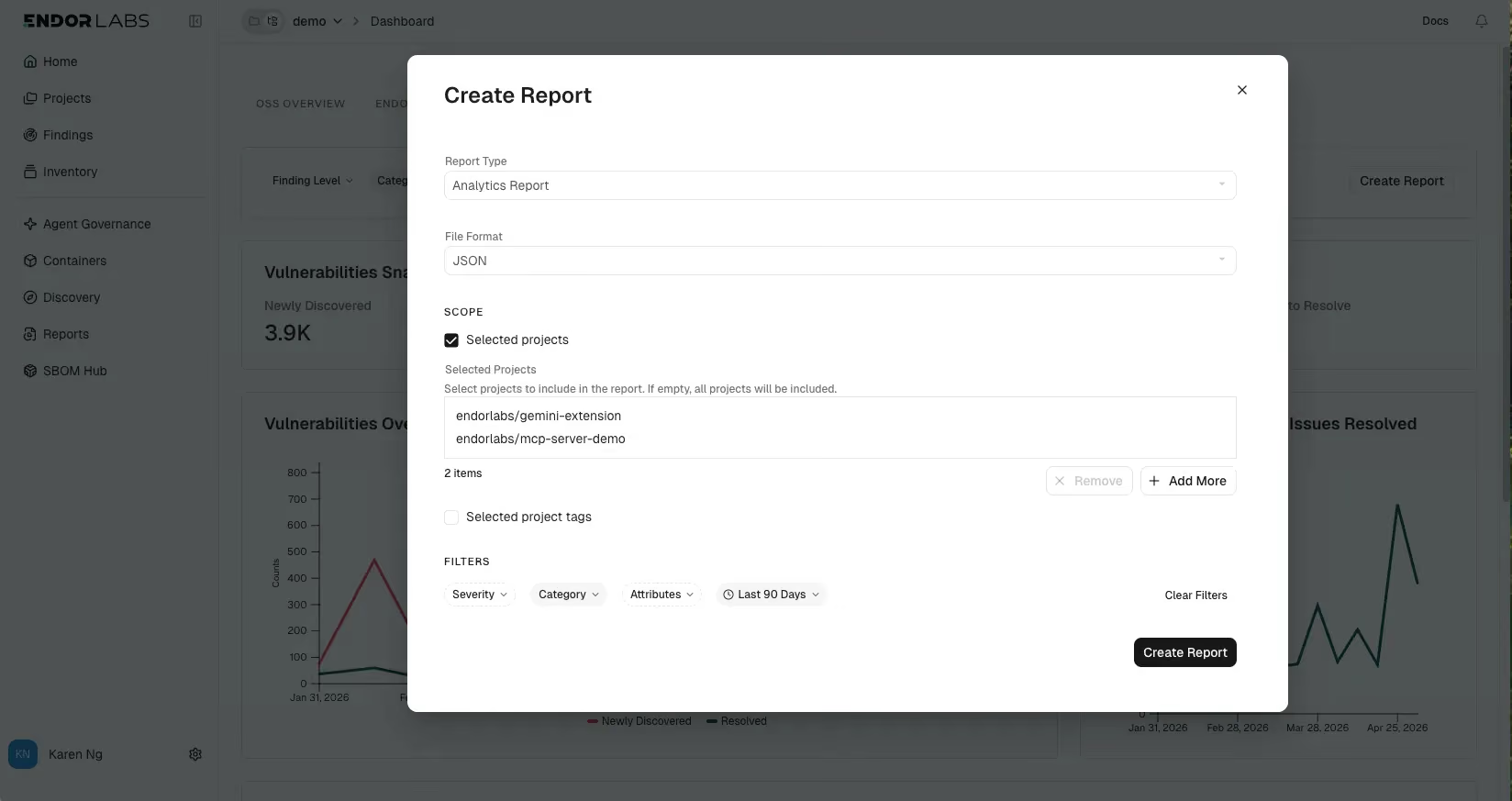
The reporting system was designed for that rhythm. A developer triggers a report from the page they are already on. Because reports run on the platform as background jobs, they can close the page, switch projects, hand off context to engineering reviews, or attach a snapshot to a ticket without losing the work. The result lives on the new Reports page, where every report they have run shows its name, scope, status, and timestamp. They can monitor in-flight jobs, return to old ones without re-running anything, and get a notification when a long-running report is ready. The flow stays in their hands. The platform carries the wait.
The Compliance Lead’s Audit Rhythm
Audits and compliance reviews are a different rhythm entirely. Compliance and legal leads live here most often, along with anyone preparing artifacts for review by people outside the security team. Work cycles are long: quarterly trends, audit reviews that span weeks, license documents that get marked up across multiple sessions before a product ships. A compliance lead navigates the platform to find what they need, then exports it for the people who will actually review it. The output gets attached to a release, shared with legal counsel, sent to an external auditor, included in an executive summary. The people consuming what was exported may never log in to the platform themselves. For them, the report is the product.
That changes the shape of the design. License notice files need formats legal review can mark up, and those files reviewed by both engineering and legal before they ship with a release no longer depend on someone keeping a browser tab open through the handoff. Reports need to stay accessible to the same person weeks later, and to a colleague who joins the review halfway through. The same report definition has to support an ongoing reporting cadence used for steering committees, board updates, and program reviews. Compliance work moves slowly, often across multiple people, and the system carries the weight of that. The artifact has to outlast the moment it was generated.
The AppSec Engineer's Automation Rhythm
Automation is another rhythm: scripting, integrating, feeding findings into broader pipelines. AppSec engineers most often live here, along with anyone building tooling on top of Endor Labs data. People in this rhythm want raw data more than formatted artifacts, and they treat the UI as one consumer of the data among many. Their scripts, dashboards, SIEMs, and ticketing systems all need the same numbers, and an artifact that only opens in a browser is not enough. They write scripts that pull report output as JSON, pipe it into their own tooling, and integrate findings into broader pipelines. In this rhythm, the report is something a script reads.
Programmatic access has always been part of how Endor Labs works. The reporting system extends it: the CLI and API expose the same outputs the UI does, in formats that scripts can parse the same way every time.. Pipelines built today survive product evolution: adding a new report kind does not break the automation already running, and the reports an AppSec team automates today stay the same shape next quarter.
One Reporting System That Serves All Three
The temptation in serving three different rhythms would be to build three separate experiences, each tuned for one team. That would have given each user exactly what they want at the cost of three independent systems to maintain, three places where the data could drift apart, and three workflows that do not talk to each other.
The simpler answer was one reporting system whose underlying object stays the same while what surrounds it adapts. A report knows its name, its scope, its parameters, and its state. The new Reports page is where any team can find what they have run, regardless of which rhythm generated it. In triage, a developer triggers and forgets. In an audit, a compliance lead receives and reviews. In automation, an AppSec engineer scripts and integrates. The same report has its own moment in each rhythm.
Making that work needed engineering to rebuild the system underneath. Reports now run as background jobs the platform owns. A user can trigger a report and then close the page, switch projects, or step away. The work continues, the status is visible while it runs, and the result is ready when they come back. The same report serves both the UI and the API equally. What users see is simple because the system underneath does the heavy lifting.
Bringing reporting into the platform also moved more of the work into the customer's own hands. The data has been accessible via Endor Labs' API for a long time, and teams that wanted to write their own scripts have always been able to. For teams that could not, getting the data they needed often meant working with the Endor Labs team, which added time and coordination between asking and answering. Standard reports inside the platform let any team produce what they need on their own schedule.
Looking Ahead
Different teams have different rhythms, and a reporting system that respects that is one less thing for a security team to work around when they want to share results, ship a release, or build automation on top of the platform.
At Endor Labs, we design for teams who want to move fast and secure smarter. Book a demo to see how Endor Labs can streamline your workflows at scale and help your teams work together more efficiently.
What's next?
When you're ready to take the next step in securing your software supply chain, here are 3 ways Endor Labs can help: